소개
This guide will show you how to replace the battery in your phone if it is old, damaged, or losing its charge too quickly. The replacement process is simple and only requires three steps.
필요한 것
-
-
-
Insert the plastic opening tool between the charging port and the rear case.
-
Pry the end of the rear case up from the charging port.
 FixBot에 문의하기
-
-
-
-
Run the plastic opening tool along the seam on the side of the phone to remove the rear casing.
-
-
-
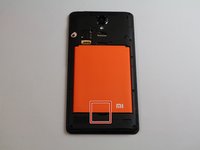
Locate the indentation at the bottom of the battery.
-
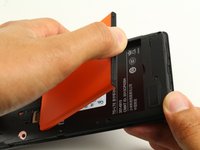
Place a finger in the indentation and lift up to remove the battery.
-
-


To reassemble your device, follow these instructions in reverse order.
다른 6명이 해당 안내서를 완성하였습니다.

팀

Cal Poly, Team S22-G4, Livingston Spring 2017 Cal Poly, Team S22-G4, Livingston Spring 2017 회원
CPSU-LIVINGSTON-S17S22G4
4 회원들
안내서 32개를 작성함
