주요 콘텐츠로 건너뛰기

Yujin Robot iCLEBO Arte Battery Replacement Guide

필요한 것

  1. Yujin Robot iCLEBO Arte Battery Replacement Guide, Battery: 1 단계, 이미지 3개 중 1개 Yujin Robot iCLEBO Arte Battery Replacement Guide, Battery: 1 단계, 이미지 3개 중 2개 Yujin Robot iCLEBO Arte Battery Replacement Guide, Battery: 1 단계, 이미지 3개 중 3개
    • Locate and unscrew the two 15mm screws with a Phillips #2 screwdriver.

  2. Yujin Robot iCLEBO Arte Battery Replacement Guide: 2 단계, 이미지 3개 중 1개 Yujin Robot iCLEBO Arte Battery Replacement Guide: 2 단계, 이미지 3개 중 2개 Yujin Robot iCLEBO Arte Battery Replacement Guide: 2 단계, 이미지 3개 중 3개
    • Remove both screws shown by rotating them counter-clockwise.

  3. Yujin Robot iCLEBO Arte Battery Replacement Guide: 3 단계, 이미지 1개 중 1개
    • Remove the battery compartment's lid.

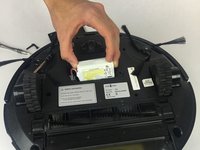
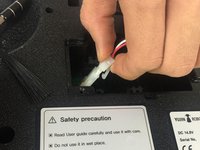
  4. Yujin Robot iCLEBO Arte Battery Replacement Guide: 4 단계, 이미지 2개 중 1개 Yujin Robot iCLEBO Arte Battery Replacement Guide: 4 단계, 이미지 2개 중 2개
    • Slide the battery out, and disconnect it from the robot by squeezing the tab on the power cable.

    • If you pull too hard on the connector without properly squeezing the tab, something will break.

결론

To reassemble your device, follow these instructions in reverse order.

다른 한 분이 해당 안내서를 완성하였습니다.

작성자

2다른 기여자 명과 함께

Trent Bingel

회원 가입일: 02/28/17

437 평판

안내서 4개를 작성함

USF Tampa, Team S2-G3, Nance Spring 2017 USF Tampa, Team S2-G3, Nance Spring 2017 회원

USFT-NANCE-S17S2G3

4 회원들

안내서 14개를 작성함

1가이드 댓글

Tried 2 different new batteries and still won’t charge

desrn55 - 답글

댓글 쓰기

조회 통계:

지난 24시간: 0

지난 7일: 1

지난 30일: 15

전체 시간: 2,986