소개
Most drones fly with the aid of propellers, which rotate rapidly to generate lift. They are similar to helicopters. The propellers are vital to the function of the drone. Although the Yuneec Typhoon H Plus is rated to continue working while only 5/6 of its propellers are functional, it is best to replace all damaged or missing propellers as soon as possible. This guide will show you exactly how to replace a propeller on the Yuneec Typhoon H Plus. No special skills or tools will be necessary for this replacement.
-
-
-
Locate the broken propeller and figure out if it is a A-propeller or B-propeller.
-
An A-propeller will have a black button in the center and an A imprinted on the propeller.
-
A B-propeller will have a white button and a B imprinted on the propeller.
 FixBot에 문의하기
-
-
-
-
Hold the base of the propeller with your pointer finger.
-
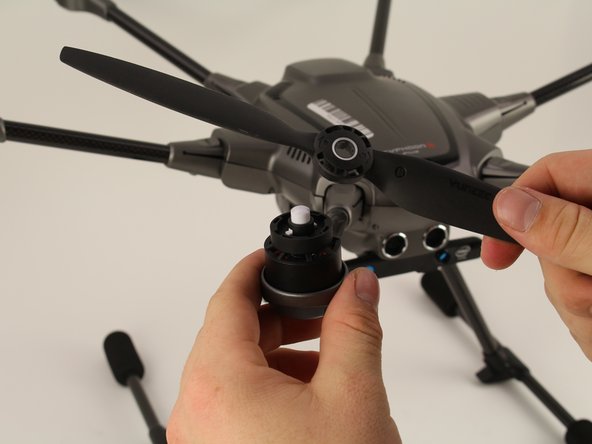
Make sure to continue to hold the button down. Rotate the propeller counter-clockwise, holding the base steady.
-
Lift the propeller off the drone.
-
-




To reassemble your device, follow these instructions in reverse order.

팀

Cal Poly, Team S2-G1, White Winter 2020 Cal Poly, Team S2-G1, White Winter 2020 회원
CPSU-WHITE-W20S2G1
4 회원들
안내서 5개를 작성함
