소개
Use this guide to replace the Roomba's battery if the device shows signs of a faulty or damaged battery. Signs of a bad battery include an inability to hold charge or a short run time while cleaning. Battery damage can be caused by overuse, or exposure to heat and water.
필요한 것
-
-
-
Flip the Roomba upside down.
-
Unscrew the single 5 mm screw on the yellow side sweeper using the Phillips #2 driver.
 FixBot에 문의하기
-
-
-
-
-
-
Using the Phillips #2 driver, remove the four 10 mm screws that hold the back panel in place.
-
-


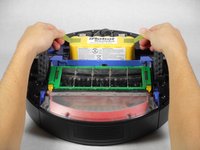
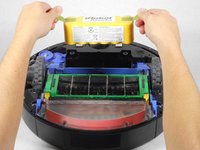
To reassemble your device, follow these instructions in reverse order.
다른 10명이 해당 안내서를 완성하였습니다.

팀

Cal Poly, Team 1-22, Maness Fall 2015 Cal Poly, Team 1-22, Maness Fall 2015 회원
CPSU-MANESS-F15S1G22
4 회원들
안내서 21개를 작성함
