학생-기여 위키
자사 교육 프로그램의 멋진 학생들이 이 위키를 만들었습니다.
기기 전원이 켜지지 않음
기기가 충전되지 않거나 전원이 켜지지 않습니다.
결함이 있는 충전 케이블
기기와 벽면 콘센트의 케이블 연결 상태가 단단한지 확인하세요. 충전 표시등이 켜지지 않으면 충전기에 결함이 있는 것입니다. 충전기 교체를 고려해 보세요.
결함이 있는 배터리
기기 충전 표시등은 켜져 있는데 기기가 충전되지 않거나 플러그를 뽑았을 때 전원이 유지되지 않는다면 배터리에 결함이 있는 것입니다. 이 안내서를 사용하여 배터리를 교체하세요.
사진 및 비디오 품질 저하
비디오나 이미지가 왜곡되거나 흐릿하게 보이고, 색상이 변했습니다.
카메라 렌즈 오염
카메라 렌즈에 이물질이나 흠집이 있는지 확인하세요. 이물질이 있다면 유리 세정제로 카메라 렌즈를 닦아 주세요. 렌즈 안쪽에 이물질이 있다면 이 안내서에 따라 렌즈를 분리하고 렌즈 내부를 청소하세요.
카메라 렌즈 손상
카메라 렌즈에 깨진 곳, 금이 간 곳 또는 긁힌 자국이 있는지 확인하세요. 이러한 손상이 발견되면 이 안내서를 사용하여 렌즈를 교체하세요.
낮은 오디오 품질
비디오 재생 중에 오디오를 듣는 데 어려움이 있습니다.
마이크 오염
녹음된 오디오 품질이 왜곡되어 재생된다면, 에어 스프레이(can of compressed air)를 사용하여 기기의 마이크를 청소하세요.
결함이 있는 스피커/마이크
에어 스프레이로 마이크를 청소해도 해결되지 않는다면, 이 안내서를 사용하여 기기 스피커 교체를 고려해 보세요.
기기 과열
기기가 무작위로 꺼지거나 기기 화면에 과열 메시지가 표시됩니다.
배터리 과열
배터리가 매우 뜨거워지거나 과열된다고 느껴지면 이 안내서에 따라 배터리를 분리하세요. 배터리를 분리한 상태에서 다시 사용하기 전에 실온으로 식히세요.
SD 카드 처리 속도 미흡
일반적으로 기기는 사진과 비디오를 SD 카드에 기록할 때 온도가 다소 상승할 수 있습니다. SD 카드가 지나치게 뜨겁거나 과열되는 경우 새 SD 카드 구입을 고려하세요.
환경적 노출
기기가 현재 열 노출이 심한 덥거나 건조한 장소에 있다면, 식힐 수 있는 장소로 옮기세요.
다른 기기에 연결할 수 없음
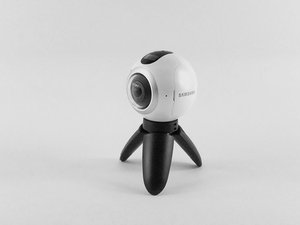
Samsung Gear 360이 다른 기기에 제대로 연결되지 않습니다.
Samsung Gear 애플리케이션을 통한 재연결
스마트폰에서 Gear 360 애플리케이션을 실행하세요. 휴대전화의 Bluetooth 및 Wi-Fi 다이렉트가 자동으로 켜집니다. 연결을 탭하고 화면의 지침에 따라 연결을 완료하세요. 실패할 경우, 기기를 다시 시작하고 Bluetooth 설정에서 검색 가능(discover-ability) 상태가 켜져 있는지 확인하세요.
작동 중 Samsung Gear 360 멈춤 현상
배터리를 뺐다가 다시 끼우세요. 일반적으로 이렇게 하면 카메라가 재부팅되지만, 사용자 입장에서 너무 자주 발생하고 있습니다.
타임랩스 기능이 설정된 간격으로 촬영하지 않음
이 문제에 대한 해결책은 찾지 못했습니다.

팀

USF Tampa, Team S3-G5, Sullivan Spring 2017 USF Tampa, Team S3-G5, Sullivan Spring 2017 회원
USFT-SULLIVAN-S17S3G5
4 회원들
안내서 84개를 작성함

댓글 28개
I have new gear 360 2017. It turns on andconnects.. ...until I put in the sd card.. then it won't turn on.
rob hoy - 답글 공유
If the Samsung 360 will not turn on. Plug it into your power source and hold down the power button and the menu button at the same time, for fifteen seconds. This worked for my 360.
Mary Kelly - 답글 공유
Think I might have stumbled upon a solution of sorts: I had problems connecting my Gear 360 camera with the Gear 360 (New) app on my Samsung S6. No help from tech support, as usual. So, after bumbling around, I thought I'd
1. Uninstall Samsung Accessory Service (in the app manager).
2. I also uninstalled the Gear 360 app.
3. Unpaired the Gear 360 camera on Bluetooth.
4. Re-started everything.
5. Re-installed just the Gear 360 app on my phone.
6. Attempted to re-connect the Gear 360 camera from within the app.
7. I believe this would trigger the app to automatically install the proper Samsung Accessory Service app.
8. The app started to connect properly to the camera.
Now, the app still isn't impressive but at least that got the camera to connect to the phone app.
Good luck.
bastogne97 - 답글 공유
Just had the same problem, but i was able to fix it by reformatting the SD Card.
To check if this is the problem just remove the sd card and see if it turns on. If it does and says "No SD Card" try putting it back in and if it turns off again then you should reformat the SD Card to exFat32 on your computer. It worked for me and maybe it could work for you as well.
W Marketing Group - 답글 공유
I just bought the Gear 360 (2017) and paired it with my Galaxy S8+ .. it took a couple of photos using the phone and the Gear 360 (new) app. Then on taking the third photo it got stuck on "Capturing". No matter what i do it will not take photos now. I restarted it , the phone nothing happens. the shutter button on the camera also doesnt not works. if i reset it using the app, it will take a couple of photos and then the same issue.
any suggestion guys ?
Craig - 답글 공유