학생-기여 위키
자사 교육 프로그램의 멋진 학생들이 이 위키를 만들었습니다.
스피커가 블루투스로 연결되지 않음
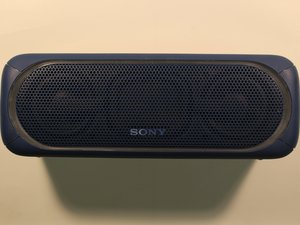
Sony 스피커의 블루투스 연결에 문제가 있습니다.
스피커가 다른 기기에 연결됨
주변의 다른 모든 기기가 스피커에서 연결 해제되어 있고 블루투스가 꺼져 있는지 확인하세요. 그런 다음 스피커에 다시 연결을 시도하세요.
스피커의 블루투스 기능을 켜는 방법을 모름
블루투스를 연결하려면 먼저 스피커가 충전되어 있고 켜져 있는지 확인하세요. 또한 스피커에 연결하려는 기기가 충전되어 있고 블루투스 기능이 켜져 있는지 확인하세요. 다음으로, 블루투스 표시 등이 깜박이기 시작할 때까지 스피커의 페어링 버튼을 길게 누르세요. 연결하려는 블루투스 기기에서 연결할 스피커 옵션으로 "SRS-XB40"을 선택하세요. 암호를 입력하라는 메시지가 나타나면 "0000"을 입력하세요. 성공적으로 연결되면 스피커의 블루투스 표시 등이 계속 켜져 있습니다.
Sony 스피커를 초기화할 수 없음
기기 초기화 방법을 잘 모르겠습니다.
스피커 초기화 방법을 모름
초기화 버튼은 스피커 뒷면의 고무 캡 아래에 있습니다. 캡을 열고 핀, 종이 클립 또는 뾰족한 물체로 "RESET" 버튼을 누르세요. "RESET" 버튼을 누른 후 평소처럼 스피커를 켜세요. 전원이 켜지지 않으면 가까운 Sony 판매점에 문의하세요.
스피커 오디오가 정상적으로 들리지 않음
스피커에서 오디오 출력이 낮거나 전혀 나오지 않습니다.
연결 상태 불량
AUX 케이블 연결을 사용하는 경우, 케이블이 스피커와 사용하는 오디오 기기에 모두 단단히 연결되어 있는지 확인하세요. 블루투스 연결을 사용하는 경우, 연결을 해제했다가 스피커에 다시 연결해 보세요. 이 방법으로도 해결되지 않으면 사용 설명서를 참조하거나 가까운 Sony 판매점에 문의하세요.
무선 간섭
재생 품질을 개선하려면 기기의 위치를 변경하거나 다른 무선 연결을 꺼보세요. 또한 전자레인지 및 다른 블루투스 기기에서 최대한 멀리 떨어져 보세요.
스피커가 빨리 꺼짐
Sony 스피커를 완전히 충전한 후에도 빨리 꺼집니다.
배터리가 충전 상태를 유지하지 못함
배터리 사용 시간은 약 12시간으로 예상되지만, 주변 온도, 사용 조건, 볼륨 레벨에 따라 달라질 수 있습니다. 충전 중에 주황색 충전 표시 등이 켜지지 않으면 다음을 확인하세요: 마이크로 USB 케이블이 USB AC 어댑터에 단단히 연결되어 있는지 확인하세요. USB AC 어댑터가 스피커와 AC 콘센트에 단단히 연결되어 있는지 확인하세요. 이러한 권장 사항을 시도했음에도 기기 전원이 여전히 켜지지 않는다면 기기 배터리에 대한 서비스가 필요할 수 있습니다.
LED 조명이 켜지지 않음
LED 조명이 광고된 대로 작동하지 않습니다.
조명을 켜는 방법을 모름
스피커가 켜진 상태에서 "EXTRA BASS - LIGHT" 버튼을 약 3초간 길게 누르면 조명 기능을 켜거나 끌 수 있습니다.

팀

University of Alabama, Team S1-G1, Bedsole Spring 2018 University of Alabama, Team S1-G1, Bedsole Spring 2018 회원
UA-BEDSOLE-S18S1G1
4 회원들
안내서 72개를 작성함

댓글 17개
I lost my charger..then I bought a different charger with six set of different voltage..so I'm charging my speaker with a 9v ac adapter and my speaker won't even charge..orange light keeps going on n off..what should I do
Safai Lio - 답글 공유
Hey man i had the same problem at first, you just got to make sure you put it at the proper voltage. These speakers take 5V or less. So turn it to something lower than that such as 4.5 or 3. it will t ake longer but it will work.
E N - 답글 공유
My SRS XB40 just won't hold a connection. After pairing it doesn't output music and drops almost immediately. This is happening with the phone. I have tried phone with other BT speakers and works just fine so this isn't the phone.
With a laptop I have to pair it every time and it holds the connection which is strange but I have to pair it everytine. I have tried to both initialise and rest but nothing. Is the Bluetooth module in the speaker dead? When I connect with a 3.5mm jack it works fine. Speaker charges fine. I've scratched everywhere online and no one seems to be experiencing this.
Mustafa Ziraba - 답글 공유
Is it possible that when the battery is dead, i mean realy dead,
the whole speaker won´t work anymore. Even with an external powersupply.
(charge lamp lights up, when put it on, it lights up for about 5 sek. then it changes automatically back into charching mode)
I just want to checkout first if fixing is an option for me. I dont have the knowledge to target electrical problems…
Thanks
tobi_hofer - 답글 공유
Is it possible that when the battery is dead, i mean really dead,
the whole speaker won´t work anymore. Even with an external power supply.
(charge lamp lights up, when put it on, it lights up for about 5 sec. then it changes automatically back into charging mode)
I just want to checkout first if fixing is an option for me. I don’t have the knowledge to target electrical problems…
Thanks
tobi_hofer - March 23
__________________________________________
This is exactly the same problem I’m having with my XB40. In my case at least, from what I’ve read of other people’s similar problem, I think I may have burned out something inside when attempting to charge the speaker with what I now suspect may have been an inappropriate charger, one that didn’t properly match up in regards to voltage and/or amperage. Not sure what I can do at this point.
tcny05 - 답글 공유