학생-기여 위키
자사 교육 프로그램의 멋진 학생들이 이 위키를 만들었습니다.
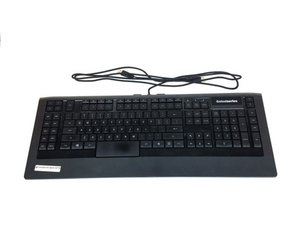
이 문제해결 페이지는 SteelSeries Apex 64145의 문제를 진단하는 데 도움을 줍니다.
키가 반응하지 않음
키를 눌렀을 때 일부 또는 모든 키가 반응하지 않습니다.
USB 포트 결함
키보드를 연결할 때 컴퓨터의 다른 USB 포트로 변경해 보세요. 컴퓨터의 포트가 고장 났거나 장치를 제대로 인식하지 못하고 있을 가능성이 있습니다. 포트가 고장 난 경우, 이 교체 안내서 SteelSeries Apex 64145 USB 포트 커넥터 교체를 확인하세요.
드라이버 오류
키보드를 연결한 직후 컴퓨터가 이를 인식하지 못하는 경우, SteelSeries 웹사이트 이 링크를 통해 업데이트된 버전의 드라이버나 정상 작동하는 이전 버전을 설치해 보세요.
키 파손
키가 물리적으로 손상된 경우(균열, 긁힘, 위치 틀어짐), 파손된 키를 교체하는 방법에 대한 저희 교체 안내서를 참고하세요. SteelSeries Apex 64145 키 교체
LED 조명이 켜지지 않음
키보드를 연결해도 조명이 들어오지 않습니다.
LED 수명 종료
새 LED를 구매하여 교체해야 합니다. 수명이 다한 LED를 교체하는 방법과 구매해야 할 LED 유형에 대한 안내서를 참고하세요. SteelSeries Apex 64145 LED 교체
키보드가 흔들리고 균형이 맞지 않음
고무 받침대가 없거나 손상되었습니다.
현재 받침대가 너무 닳았거나 손상됨
마모된 현재 받침대를 키보드 상자에 포함된 새 받침대로 교체하세요. 받침대 교체 방법에 대한 안내서를 참고하세요. SteelSeries Apex 64145 고무 받침대 교체
키가 하나 눌린 채로 고정됨
키를 누른 후 원래 위치로 돌아오지 않습니다.
키의 오염
키가 튀어 나올 때까지 조심스럽게 위쪽으로 들어 올린 다음, 상온의 물로 키를 깨끗이 씻으세요. 키를 말린 후, 다시 키보드 위치에 부드럽게 눌러 끼우세요.
컴퓨터에서 키보드를 인식하지 못함
컴퓨터의 장치 목록에 키보드가 나타나지 않거나 SteelSeries Engine에서 표시되지 않습니다.
잘못된 USB 포트에 연결됨
키보드가 인식이 잘 안 되는 USB 포트 유형에 연결되었을 수 있습니다. 예를 들어, 키보드가 현재 USB 2.0 포트에 연결되어 있다면 USB 3.0 포트에 연결해 보세요. 키보드의 USB 플러그 두 개가 모두 동일한 유형의 USB 포트에 연결되어 있는지 확인하세요.
드라이버 오류 또는 드라이버 누락
현재 드라이버가 최신 상태이며 컴퓨터에 제대로 설치되어 있는지 확인하세요. SteelSeries 웹사이트 이 링크를 사용하여 소프트웨어 다운로드 방법을 확인하세요.

팀

USF Tampa, Team S1-G1, Nance Spring 2017 USF Tampa, Team S1-G1, Nance Spring 2017 회원
USFT-NANCE-S17S1G1
4 회원들
안내서 60개를 작성함

댓글 4개
PART-1
The problem I am having is that a few keys are not triggering anymore
the keys are as follows:
(the period key, greater-than key, question mark key, right shift key & finally the quotation mark key) I might have to get the plastic circuit sheets to replace the ones I have. because it seems that part of the plastic circuit sheets might be damaged some how. I was playing a video game and then poof out of no where all the lights on the keyboard went out and keyboard stopped responding
I unplugged the keyboard and even tested it on another computer and it didnt want to go back on
so i opened the keyboard to check if something burnt out, I cleaned everything with rubbing alcohol and let it dry. put everything back together and boom keyboard started to function only to have the keys mentioned above not working I re-opened the keyboard several times to make sure nothing was pinching anything.
Twsted - 답글 공유
PART-2
i even tested it by just pressing the circuit allocated connections from the 3 plastic circuits sheets under the membrain sheet within the within the keyboard and it would not type those keys out,
but it does it for all the other keys. So im sure the plastic circuit sheets are damaged for some odd reason hoping that if I call or email Steelseries, that I can purchased a new set of circuit sheets from them.
This is my favorite keyboard as I do LOVE chiclets keyboards
I wish Steelseries would make a newer version of this APEX-350 without taking away ANY of the sets of keys or layout it already has , but rather improve on it. and have every key lit up individually colored - I can only wish
If Steelseries could make a Chiclet `mechanical` keyboard that would be insane :)
like a APEX-350 MARK-II mechanical keyboard, I would be first in line to buy it.
Twsted - 답글 공유
I have a problem so I left on holiday 3 weeks ago my keyboard apex pro tkl 2023 wireless was fine but when I came home it would not work at all . The plugs are in everything is in but won’t work at all. The led wouldn’t turn on , it doesn’t even show the menu pad . Won’t show anything when I’m charging it either . Can somebody help ?
Geek - 답글 공유
some of my keys f9-f12 light up orange and my keyboard just stops working
Kayston Phillips - 답글 공유