
주요 콘텐츠로 건너뛰기
수리 커뮤니티 가입 - 계정 만들기

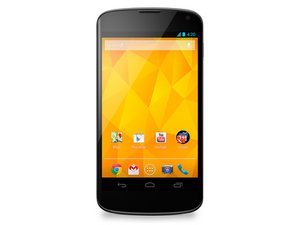
네 번째 Google Nexus 스마트폰, 2012년 11월 13일 출시.

Soft keys are not working

Am using Google lg nexus 4 and software version is 5.0.1. 4 days ago I switched off my mobile and put charging for 2 hours then I removed charging, turned on my phone and used 3 hours , suddenly my phone soft keys (i.e back, home & recent) didn't response, I thought that my phone was hang. So restarted my device, but still my soft keys touch wasn't working, so I switched off my mobile for 2 hours, after turn on my mobile that touch wasn't working, so I decided to format my device, after reset my device same problem I had faced. I can't understand why my soft keys are not working. Please help me what to do.....

이 질문에 답하기 저도 같은 문제가 있습니다

좋은 질문입니까?

점수 2
댓글 달기

답변 1개

가장 유용한 답변

I would suggest you go into Settings, About phone, and tap Build Number until it tells you "You are a developer." Back out and now you have Developer Options above About phone. Enter that, and look for the Input section. Enable Show touches and Pointer location. Now touch on your screen, and "draw" down to the soft home keys.

Does the screen indicate registering your screen touches over that area? If it does, then the screen is working, and there must be something else wrong. Depending upon your ROM and version, you might need to factory reset your phone, or flash a factory image from Google.

Disable Developer options before pursuing other avenues.

이 답변이 도움이 되었나요?

점수 1
댓글 달기

답변을 추가하세요

yogeshyogi2050 영원히 감사할 것입니다.
조회 통계:

지난 24시간: 0

지난 7일: 6

지난 30일: 17

전체 시간: 461