
주요 콘텐츠로 건너뛰기

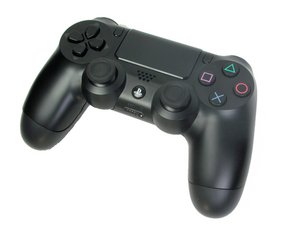
PS4 컨트롤러 모델 CUH-ZCT1. 소니 컴퓨터 엔터테인먼트에서 2013년 11월에 출시한 이 6축 3.7V 리튬 이온 배터리 컨트롤러 수리는 복잡하지 않습니다. (참고: 해체 안내서는 이 모델용이 아닙니다.)

My Ds4 controller is overheating

My ds4 controller is over heating because i used a fast charger and my old battery didnt charge so i brought i new battery but it still is overheating evertime i turn it on. I took out the ribbon cable of the touch pad and the led/port and put them back but it was still overheating. I turned on my controller while touching the mother board and i found a small box with a turn H and a • that cause alot of heat and idk how to fix it

이 질문에 답하기 저도 같은 문제가 있습니다

좋은 질문입니까?

점수 5
댓글 5개

To find the h• look at the battery tray and above the screw and below the battery is a square cut out with a square box with a h• the is tilted

someone help me

having the same problem. bought new battery and charger and it is still overheating

Having the same problem, already change the battery, thinking of changing the charger port as well.

There is no way to fix this i have took the controller apart and found that my motherboard was fried from using a fast charger. THE ONLY WAY TO FIX THIS IS TO BUY A NEW CONTROLLER. hope this helps guys

댓글 달기

답변 10개

가장 유용한 답변

I too used a fast charger for months with no issues but then it started getting hot. i stopped using it and havnt used it since, and now 2 of my controllers are dead. i have now replaced both batteries with new ones... Twice! first with 2000mAh batteries , to no avail... and then with the factory 1000 mAh batteries. so far they are both getting hot and not holding a charge for more a few mins.

not sure at this poiint maybe i fried the charging port?

이 답변이 도움이 되었나요?

점수 1

댓글 2개:

I have the same problem I replaced the battery and usb charger port and stopped using the fast charger. And it still gets hot and stops charging after a while.

Hey, replace the charging port, I did mine after the batteries, and it took care of it. unfortunately I haven't found them for less then like 22 bucks... so for under 30 you can replace your sticks, batteries, and charge port and have a new controller.. better than $65 i guess... Moral of the story, don't use rapid charger. Also Hyperkin (the company that makes the retron5) makes a great usb cord, nice connectors, like 10' and fabric wrap cord.

댓글 달기

Hi guys. I've the same problem. I bought a new battery and changed it but the problem still there. I turned on the controller when it was open trying to guess where the !&&* was the problem, and when I touch the mainboard it was really hot, I've been looking for that piece on ebay, amazon, etc, but it's quite expensive 30 to 40 bucks, so I think it would be better to buy a new one...

이 답변이 도움이 되었나요?

점수 1
댓글 달기

Put every thing back as it was. Stop using the fast charger. This should fix your trubble.

이 답변이 도움이 되었나요?

점수 0

댓글 2개:

I did but it still is overheating ever 5 min

Same here and so my controller won't even hold the charge either I hope someone has a solution

댓글 달기

I am having the same problem but no one seems to know what to do

이 답변이 도움이 되었나요?

점수 0
댓글 달기

Hi bro, it same problem here... after all of my tries to fix this problem... i think it was charging port problem, because all of my DS4 parts working fine but i noticed that there is a very hot surface on my DS4 motherboard (80° C approx. untouchable) coming from charging port because also the charging port is a little bit hot... so let me try to change the port and i will tell you the result...

이 답변이 도움이 되었나요?

점수 0

댓글 1개:

Any news on a solution guys?

댓글 달기

Whats the result? Same problem here. I changet the battery. Cheap one and factory one. None of them works. When i connect it to my PS TV it says: "can not supply more power. Please disconnect the device."

When i connect new DS it charges without the message.

How to fix thos issue pleaseee

이 답변이 도움이 되었나요?

점수 0
댓글 달기

Lmao I put my controller in the freezer and it actually started charging again

이 답변이 도움이 되었나요?

점수 0

댓글 1개:

For how long

댓글 달기

I spit into it to fix the joystick and it wont turn on

이 답변이 도움이 되었나요?

점수 0
댓글 달기

EDIT: Before assuming the BD92001 chip is dead, first try removing and then re-seating the ribbon cable from the touchpad module and if it still overheats or doesn't charge then it would more likely be the chip defected.

The likely cause is a defected BD92001 chip (battery power manager) which seems to break when used with fast-chargers. This chip is difficult to remove and replace without fancy equipment (hot-air/IR rework station) due to a large ground pad on the bottom of the chip. That chip costs about $10 from chinese vendors (note: 3x more price if bought from North America vendors, but they just middle man the chinese vendors sooo why pay more when its same delivery time and cheaper to order direct). A skilled and equipped electronics technician would be able to do the repair within 15 minutes if they had the part on hand.

Here's a vendor that I recently ordered this part from: https://www.zedlabz.com/products/replace...

An alternative solution is to swap out the whole controller motherboard with a working motherboard from a donor controller.

이 답변이 도움이 되었나요?

점수 0
댓글 달기

I found a solution in which you could still use the controller but it involves adding unintended parts already. I first noticed that if the battery was first fully charged when I got it replaced, the controller worked until it ran out. then I tried charging it by tapping wires to it and the controller worked when I put it back. this gave me the idea of adding a USB cable to the battery pack so it could still charge the battery since the microchip no longer works. I don't know if this would last but it works.

이 답변이 도움이 되었나요?

점수 0

댓글 1개:

U can use a charger but it has to be 5v 800 mah or under 800 mah

댓글 달기

답변을 추가하세요

John Y 영원히 감사할 것입니다.
조회 통계:

지난 24시간: 3

지난 7일: 13

지난 30일: 87

전체 시간: 18,791