
주요 콘텐츠로 건너뛰기
수리 커뮤니티 가입 - 계정 만들기

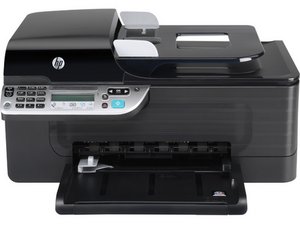
2009년 1월에 출시된 사무용 잉크젯 프린터. 모델 번호 G510n.

Computer does not communicate with printer after 5 yrs!

I have an HP laptop I bought about 4 yrs ago with an HP office jet 4500 wireless. After working ok for yrs, the computer now cannot communicate with the printer. I have checked connection, checked printers and devices. When I click on HP solutions it says 'printer not connected' when it obviously is. What now? I'm really not in the mood to buy another device. Can I repair the wireless card on the printer if that is the issue?

답변되었습니다! 답변 보기 저도 같은 문제가 있습니다

좋은 질문입니까?

점수 4
댓글 2개

You had an inkjet printer that ran for five years? What the secret to your success? I do good too get one to last for two.

의

You should check the wireless settings, many times my printer looses it's settings and I have to manually re-enter them.

의

댓글 달기

답변 2개

선택된 해법

You can try reloading the drivers for the printer and try a simple reboot shut both machines down for a few minutes then reboot . Worse comes to worse try connecting them with a cable. The nic may be shook. I do have to agree with mayer, how have you kept a printer running for 5 years. with three kids I go through 2 a year.

https://www.youtube.com/watch?v=pQGtucrJ...

The video explains printers

Hope this helps

이 답변이 도움이 되었나요?

점수 8

댓글 3개:

Thats just to funny couldn't agree more best explanation video Ive ever seen

의

This guy knows his printers.

의

You should check the wireless settings, many times my printer looses it's settings and I have to manually re-enter them.

의

댓글 달기

A dead PRAM or CMOS battery will also cause the printer to drop off line.

이 답변이 도움이 되었나요?

점수 2

댓글 2개:

HP Laserjet 2100 not communicating with computer. Have tried to stop and start spooling...making sure nothing in que...deleted printing jobs...downloaded drivers...still won't print

의

Are you using a Mac or PC?

의

댓글 달기

답변을 추가하세요

luvbooks50 영원히 감사할 것입니다.
조회 통계:

지난 24시간: 1

지난 7일: 6

지난 30일: 15

전체 시간: 7,130