
주요 콘텐츠로 건너뛰기
수리 커뮤니티 가입 - 계정 만들기

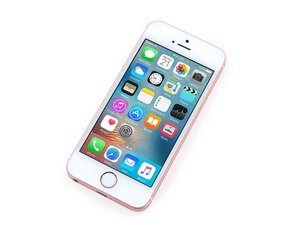
6s와 유사한 하드웨어 사양의 4-inch iPhone은 2016년 3월에 출시되었습니다. 16/32/64/128 GB 저장 옵션 및 은색, 스페이스 그레이, 금색 또는 로즈 골드로 제공됩니다. 모델 A1662 및 A1723.

Fuzzy screen after replacement?

Okay so here's my problem. I dropped my iPhone SE and the screen is now black with white lines on the side. I then proceeded to order 3 new replacement screens (Just incase one is faulty and one for spare) and when I tried the new screen in my SE it works but its fuzzy as if there is static or something similar. My question now is should I try buy an old iPhone 5s and use that screen as a replacement and put one of the aftermarket ones in that 5s and resell it if it works? Or is it possible for the logic board itself to be damaged? When I try the original screen it still turns on unlike the other guy that asked the same question here and ended up with two dead SEs.

답변되었습니다! 답변 보기 저도 같은 문제가 있습니다

좋은 질문입니까?

점수 1
댓글 달기

답변 2개

선택된 해법

A 5S replacement screen with OEM/Original parts work well in the SE but aftermarket 5S screens are known to have issues. So depending on the quality level you ordered and from who you ordered it from, it may cause various issues such as what you are seeing.

Your logic is sound though, you could use an original 5S screen on the SE and put the replacement in the 5S. As long as your upfront about it with the folks that purchase it (i.e. the screen has been repaired/replaced).

이 답변이 도움이 되었나요?

점수 5

댓글 3개:

Just as ifixit says, I am eternally greatful thank you. I will buy a 5s and use that screen and resell it as refurbished with an aftermarket screen.

About that eternal gratefulness of yours...maybe you can help me with a little problem I have... :>)

Kidding, glad I could help!

Is there a way to put a golden border around your answer? Jokes, thanks for the help.

댓글 달기

Minho is correct with the possability of you having faulty screens (Watch where you order from). When installing the aftermarket screen make sure the connector is properly seated. Also make sure that you have disconnected the battery. After Installation is complete reconnect the battery and the screen should be clear. If not send back your faulty screen. I do not beleive its your logic board as you would be having other issues but logic boards can be damaged fairly easily if you are not careful.

이 답변이 도움이 되었나요?

점수 0

댓글 1개:

Well i just hooked my perfectly fine screen up to someone elses phone and immediatly it had static issues from boot up,a bunch of horizontal wavy lines.After I put it back on my phone the screen does the same thing,as if that phone had some sort of damage that causes this permanant damage to the display(s) so im going to ahead and guess its your phone.And this came about from someone touching your phone that had no idea how important it is to be careful.As this was the case in which my screen just got ruined.It was a 12 yr old kid that had no clue what he was doing lol

The odds of 3 screens not being good as opposed to it being your phone are not very high.You probably have logicboard damage and your phone just destroyed all 3 of them lcd’s.

댓글 달기

답변을 추가하세요

Liam 영원히 감사할 것입니다.
조회 통계:

지난 24시간: 0

지난 7일: 5

지난 30일: 24

전체 시간: 6,284

