
주요 콘텐츠로 건너뛰기

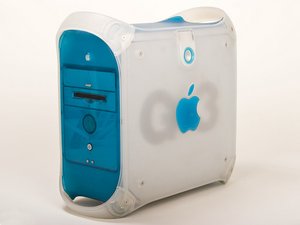
원래 PowerMac G3의 뒤를 이어 1999년에 출시되었습니다, 300-450 MHz, 64 또는 128 MB RAM, 6 또는 12 GB HDD

Can only get it to boot from disk

After a long, confusing fiasco trying to reinstall the OS on it, replacing cables, swapping out disk drives, amongst other things, I FINALLY got something other than the blinking question mark folder. (which was quite a feat for someone who knows nothing about mac's albeit a fair bit about pc's) Only problem is that I forgot that I had unplugged the HD trying to get it to boot at all. So I plugged the HD back in and all I get now is a blank white screen and no activity from the dvd drive. I tried reformatting one of my pc HD's with macdrive 8 and tried again but I get the same blank white screen. Any help, thoughts or suggestions would be very greatly appreciated, I've been on a mission trying to get my antique up and running and have come so far....I can feel I'm so close!! Please help???

답변되었습니다! 답변 보기 저도 같은 문제가 있습니다

좋은 질문입니까?

점수 -1
댓글 달기

답변 1개

선택된 해법

Possible ID conflict. Look up the jumper setting on your hard drive by doing a search for it at the manufacturers web site. If using two hard drives set one to master and one to slave. With just one hard drive you can use cable select but I prefer setting it to master. Fix the hard drive first and then connect the optical drive. The optical drives also have jumper settings. Check the ribbon cable into the logic board as that sometimes gets pulled out some when working on the hard drives.

이 답변이 도움이 되었나요?

점수 3

댓글 2개:

tried that, everything is set correctly

Boot up from your system installation disk by holding down the "C" key. Go to the second screen pull down menu to Utilities -> Disk Utility and format the drive. and give it one partition. If the drive is an old one I would select the "write zeros" option to map out any bad blocks. This takes a while but will eliminate future problems. Now install your system.

댓글 달기

답변을 추가하세요

Cera 영원히 감사할 것입니다.
조회 통계:

지난 24시간: 0

지난 7일: 2

지난 30일: 7

전체 시간: 691