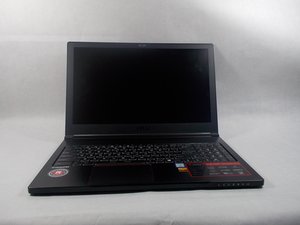

How to Replace cpu fan.
Is there a guide for replacing the fan? Bought a replacement fan for the cpu but cant uninstall original fan.
좋은 질문입니까?
점수
1
평판: 13
 1
1
 1
1
Is there a guide for replacing the fan? Bought a replacement fan for the cpu but cant uninstall original fan.
좋은 질문입니까?
평판: 767
7
3
Are you replacing one single fan like this over the CPU?
https://www.laptop-coolers.com/laptop-fa...
If so, watch this video,
https://www.youtube.com/watch?v=VApI9A4s...
It is Chinese, but I watched with no audio. Only video that I could find to help demonstrate what you need to do.
Kinda skipping through the video, what you like to see is straight from “5 mins in” to “15 mins in”…
He shows him taking out the entire cooler, and replacing thermal paste. That may be what you just want, but if you really want to replace that CPU cooler. Then once you take it out, which you will see in the vid, it looks like a simple screw out and put in. (You may not have to take the entire thing out) Just watch through that video and you will get an idea. Once your in there, you will get a feel for what you need to do.
May I ask why you want to change the CPU cooler? I would not recommend doing this if you are not comfortable about it, and especially if it is not needed. What are the temps etc?
PS. If you do this, just make sure you clean off the thermal paste and replace it.
이 답변이 도움이 되었나요?
Sorry to say but that video doesn’t help. He doesn’t even touch the fans let alone show how they come apart from the heatsink. I used it today to try and get into the fans housing but it was a no go. All I ended up doing was blowing compressed air into them.
지난 24시간: 1
지난 7일: 8
지난 30일: 17
전체 시간: 8,396