
주요 콘텐츠로 건너뛰기
수리 커뮤니티 가입 - 계정 만들기

2015년 3월에 출시된 Apple의 13인치 MacBook Air 업데이트 모델은 5세대 Intel Core i5 및 i7 프로세서를 탑재하여 성능과 배터리 사용 시간이 약간 향상되었습니다.

Trackpad chip scorching hot

So milk was spilled on this Macbook Air and I powered off the computer instantly. After waiting a week or so, I started it again and it booted up with no problem. However, the trackpad and the keyboard are not working.

I opened the laptop, cleaned off the oxidation with a toothbrush and isopropyl alcohol - trackpad and keyboard still did not work.

Suspected damaged upper case cable and bought this - the error prevailed.

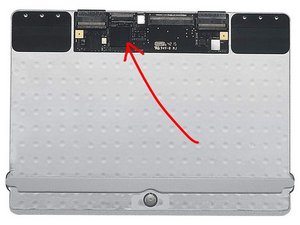
Today, once starting the look around, I noticed that a chip on the trackpad PCB was so hot that I actually got a burn when touching it. It becomes so hot so fast after powering up its insane. I’m talking about this component:
이미지

Any suggestions why this is, if this is causing the faulty trackpad and keyboard and what can be done? Would a replacement of the trackpad do the trick?

Replace the cable that connects the trackpad to the logic board compatible with the Mid 2013 to Early 2015 11" A1465 model MacBook Air laptop. Part #923-0432, 593-1603. 이미지

제품

MacBook Air 11" (Mid 2013-Early 2015) Trackpad Cable

$14.99

답변되었습니다! 답변 보기 저도 같은 문제가 있습니다

좋은 질문입니까?

점수 3
댓글 3개

hey, i have the same problem. is your trackpad working already?

Hello, It's all working perfectly ever since I replaced it.

Did you replace the entire trackpad assembly or just the cable?

댓글 달기

답변 1개

선택된 해법

You’ll need to replace the trackpad. Milk entered into the pad creating a short which is why the chip is overheating.

Here’s the needed part MacBook Air 13" (Mid 2013-2017) Trackpad and the guide to put it in MacBook Air 13" Early 2015 트랙 패드 교체. I would also replace the cable to be safe.

Replace a scratched or malfunctioning trackpad compatible with a Mid 2013 to 2017 MacBook Air 13" A1466 model laptop. 이미지

제품

MacBook Air 13" (Mid 2013-2017) Trackpad

$33.99

이 답변이 도움이 되었나요?

점수 5

댓글 6개:

Thanks for the answer. But which cable are you refering to? One cable goes from the keyboard to the trackpad and the other goes from the trackpad to the main board.

The uppercase cable carries both the keyboard and the trackpad signals to the logic board. Often times it gets damaged in the process of taking it off or incorrect installation (bent pins) But I don't think thats your P1 issue. The P1 is the trackpad its self.

Thanks for help Dan, replacing the trackpad made things work. But the trackpad behaves really weird. It clicks when its not supposed to and hoovering over icons dont always respond. Can this be a software issue?

Did you get the right trackpad & replace the cable as well? Did you adjust the click stop which is the screw in the middle.

The issue was the bluetooth which tried to connect to some other external keyboard and thats why it behaved weard. After disabling the bluetooth, it started working properly. Thanks for your support Dan!

댓글 1개 더보기

댓글 달기

답변을 추가하세요

Lirim Kadriu 영원히 감사할 것입니다.
조회 통계:

지난 24시간: 0

지난 7일: 2

지난 30일: 16

전체 시간: 4,459
