주요 콘텐츠로 건너뛰기
수리 커뮤니티 가입 - 계정 만들기

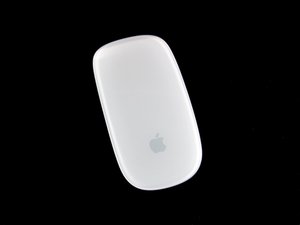
Apple Magic Mouse는 Apple Inc.에서 제조 및 판매한 멀티-터치 마우스입니다. 2009년 10월 20일에 처음 발표 및 판매되었습니다.

Can I replace the laser bulb?

Everything is working on my Magic Mouse but the laser sensor, itself. I can gesture, scroll, right click, double-click to select a word. BUT the laser no longer comes on, so I can't move the pointer. Can I replace the laser?

답변되었습니다! 답변 보기 저도 같은 문제가 있습니다

좋은 질문입니까?

점수 8
댓글 1개

can you explain me in detail that how you fixed it kaath9?

의

댓글 달기

답변 2개

선택된 해법

I've never seen this part fail. I would suspect a failed solder joint. Of course if it is less than a year old, get a warranty replacement from Apple. If not, I'd tear it down and see if I could spot the problem. Here's the teardown: Magic Mouse 분해도

이 답변이 도움이 되었나요?

점수 4

댓글 5개:

You're right mayer, mine wasn't working well, only clicks and movements but no cursor moving. Once opened, I've heater the laser pinouts with a soldering iron and it's working well now. The problem now is to fix the batteries plugs. In order to disassemble properly, we need to cut 2 plastic pieces who maintain the metallic rounded batteries plugs on the frame

의

Can I solder without removing the capacitive sensor ribbon nor the battery case? @kospeia Did you achieve to do it?

의

What Part of the mouse do you solder once you open it up?

의

Asher Solder the place where you no longer have continuity.

의

Thanks Mayer

의

댓글 달기

I had the same problem! After several attempts, I tried to push the lens with a pencil eraser, now it works fine

이 답변이 도움이 되었나요?

점수 0

댓글 3개:

It makes me laugh, this is ifixit.

의

Hello fabrizio,

Did you just press it up, without opening the mouse?

Thanks in advance!

의

Hello Antonio, yes, you can do it without opening..... but ... the operation did not last much for me :-(

I think at this point that you have to open it and solder contacts with a soldering iron!

의

댓글 달기

답변을 추가하세요

kaath9 영원히 감사할 것입니다.
조회 통계:

지난 24시간: 1

지난 7일: 8

지난 30일: 25

전체 시간: 17,565