
주요 콘텐츠로 건너뛰기
수리 커뮤니티 가입 - 계정 만들기

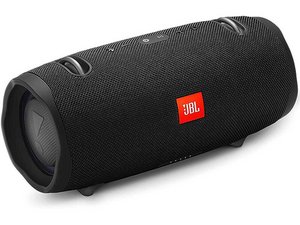
Xtreme 2는 2018년 1월에 출시된 대형 휴대용 블루투스 스피커입니다. 이 스피커는 IPX7 등급을 지원하며 최대 15시간의 배터리 사용 시간을 제공합니다. 모델: PL

Replacing a JBL xtreme 2 speaker?

I need to know how to replace a JBL Xtreme2 Speaker BATTERY?

Also can you tell me what and where my JBL+ button is or looks like?

I was trying to reset the speaker but i don’t know what a jbl+ button is?

Everything i tried hasn’t worked thus far, no indicator lights come on, won’t power on, nothing! So i can only assume it needs a new battery?

The online guide for battery replacement, doesn’t look anything like my JBL speaker! Grrrr! Lol.

이 질문에 답하기 저도 같은 문제가 있습니다

좋은 질문입니까?

점수 3
댓글 달기

답변 2개

가장 유용한 답변

Hi Wenona, has the device been powered off for a long time? If no significant amount of time (months/years) has passed since it was last used/charged, first you want to make sure the connection to cable, charger and power outlet (plug the charger directly, no extention cord, power strips etc.) is good, inspect all ports and clean any debris, lint etc. with the aid of a toothpick and compressed air (being careful not to force the dirt further inward). Report back once you checked all of this.

Also, according to the instructions reported here the right combination to perform a factory reset is "Bluetooth" + "Volume up" buttons, but the device should be turned on first I believe..

이 답변이 도움이 되었나요?

점수 1
댓글 달기

To replace a JBL Xtreme 2 speaker, follow these steps:

  1. Unplug the speaker and remove the battery.
  2. Locate the screws holding the speaker in place and remove them.
  3. Carefully remove the old speaker and disconnect the wires.
  4. Connect the wires of the new speaker in the same manner as the old one.
  5. Place the new speaker in the speaker housing and secure it with screws.
  6. Reinstall the battery and plug the speaker back in.

https://knifeplatoon.com/

이 답변이 도움이 되었나요?

점수 1
댓글 달기

답변을 추가하세요

Wenona M Lola 영원히 감사할 것입니다.
조회 통계:

지난 24시간: 0

지난 7일: 4

지난 30일: 15

전체 시간: 617
