
주요 콘텐츠로 건너뛰기
수리 커뮤니티 가입 - 계정 만들기

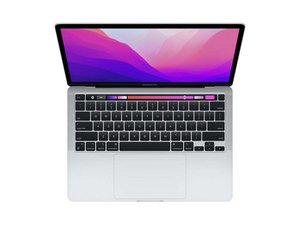
2세대 Apple 실리콘(M2 칩)과 13.3인치 Retina 디스플레이가 탑재된 MacBook Pro 13" 모델을 위한 수리 안내서입니다. 모델 번호는 A2338입니다. MacBook Air M2와 함께 2022년 7월 15일 WWDC 2022에서 처음 공개되었습니다.

MacBook Keyboard Spill Not Working

Macbook was on when around half a cup of saline solution was spilled on it. Tried to wipe it off right away and the laptop stayed on. Keyboard wasn’t working so the laptop was still on when I flipped the laptop upside down. The keyboard eventually started working so I turned the laptop off but still kept the laptop upside down. Used a blowdrier to dry it for around ten minutes. Now the display works perfectly fine but the keyboard is non functional. Touch bar doesn’t turn on, keys can’t type, and trackpad doesn’t work. Apple store said repair would be $1000 but I feel like I could fix it myself for less. How should I go about fixing this? Thanks!

이 질문에 답하기 저도 같은 문제가 있습니다

좋은 질문입니까?

점수 0
댓글 달기

답변 1개

Salt water corrodes electrical circuits! Hopefully it stopped at the keyboard/touchpad.

You'll need to either replace the full uppercase assembly (which I strongly recommend) or locate the raw keyboard and fight through the ton of plastic rivets! Most people end up distorting the Uppercase shell in the process and so far I haven't seen any M2 keyboards offered, I'm not sure if the M1 is a direct fit or not.

Then you have the Touchpad to deal with as well if it was damaged too.

Here's the Apple Repair manual 2022 13" M2 system Review Page 158 as well as Page 8 which offers the P/N info.

이 답변이 도움이 되었나요?

점수 0
댓글 달기

답변을 추가하세요

Lexie 영원히 감사할 것입니다.
조회 통계:

지난 24시간: 0

지난 7일: 2

지난 30일: 14

전체 시간: 300
