iPad 3rd Gen Digitizer the same as 2nd Gen?
Can I install a 2nd Gen iPad Digitizer into a the new 3rd Gen iPad?
If so, is it an identical match?
좋은 질문입니까?
점수
2

평판: 35
 3
3
 4
4
 1
1
Can I install a 2nd Gen iPad Digitizer into a the new 3rd Gen iPad?
If so, is it an identical match?
좋은 질문입니까?

평판: 314
8
3
They appear to be different parts (iPad 2 digitizer, iPad 3 digitizer).
That said, I've scrutinized the photos from the iFixit teardowns of both the iPad 2 and iPad 3, and darned if I can see any significant differences. The metal shield around the camera appears to have grown a spring-contact on the iPad 3 to improve contact with whatever it touches, but that looks like it. And it would be very in keeping for Apple to use the same part for both iPad 2 and 3 if they function the same way. The logic boards of each of the two even have their various connectors to the screen and speaker arrays in the same spot.
So: inconclusive. Maybe we'll luck out and an iFixit staffer will compare and contrast the parts for us.
이 답변이 도움이 되었나요?
Thank you. It would be nice of iFixit to that ;)

평판: 73
1
1
The board sockets (connectors) are the same. The iPad 3 digitizer cable is longer though. So, as stated above, you can use the iPad 3 diggie on an iPad 2 with a couple of folds on the longer cable. However, you wouldn't be able to use an iPad 2 diggie on an iPad 3. The cable just isn't long enough.
IndyElectronix
이 답변이 도움이 되었나요?

평판: 61
1
1
I just replaced an iPad 2 digitizer with an iPad 3 digitizer. Although the flex cable is different in length, it still fits the mainboard connector and has a couple of extra folds that got tucked under the screen, as far as I can tell, it works.
이 답변이 도움이 되었나요?
Mark Richard,
Please let me know, after you replaced it and completed every thing, did the digitizer looked fit on the ipad?? or there was some kind of problems??

평판: 943
4
2
1
iPad 2 digitizer does not fit iPad 3 the flex cable is totally different.
이 답변이 도움이 되었나요?
see above you just repeated what he said lol
평판: 51
7
1
I believe the connector is in a different location. I'll be doing one in about 2 weeks and can update as I have the iPad 2 in stock.
이 답변이 도움이 되었나요?

평판: 35
4
2
I would not do it. The ribbon cable is longer and is at a different angle. See photo...
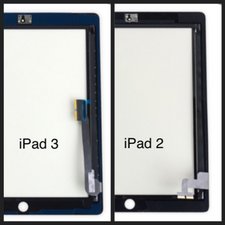
This can result in a problem sealing the screen...
이 답변이 도움이 되었나요?

Will a ipad 2 digitizer fit a ipad 1?
이 답변이 도움이 되었나요?
Not a chance. Different size and design.
I want the other way around. I have an IPad1 in pristine condition and my daughter IPad2 glass screen has a big crack. Can I swapped it out from Ipad1 to Ipad2 since my Ipad 1 is just a glorified wall clock?
iPad 1 and 2 are too different. Better buy a new third part digitizer for the iPad 2.
What about the lcd would a 3 fit a 2 and other way around?
이 답변이 도움이 되었나요?
An iPad 3 LCD will not fit an iPad 2 at all the connector is different: 3 has a ZIF socket and 2 has a metal connector with a metal clip and 3 is a retina display these are incompatible.

I just replaced a white iPad 2 screen with a black screen replacement and there seems to be a noticeable difference in the screen size. It doesn't quite fill the frame. Did I get the wrong screen ?
이 답변이 도움이 되었나요?
지난 24시간: 2
지난 7일: 14
지난 30일: 60
전체 시간: 27,559


댓글 3개
Was wondering the same thing. I want to get a color conversion for mine but all of the ones I've found have been iPad 2's...
Colton 의
I checked my ipad imei and said it was an ipad 3G. My touch screen was cracked so i need to replace it. The question i have no see ipad 3G it always ipad 3 in selling touch screen. Can i buy ipad 3 touch screen to my ipad 3G it will work? Please help me.
Semjhi 의
no they are different
iPod Fix It 의