

My microphone is not working
When I make calls they can’t hear me or when I’m on Snapchat they can’t hear me they just hear static what part would fix this
좋은 질문입니까?
점수
1
평판: 13
 2
2
 1
1
When I make calls they can’t hear me or when I’m on Snapchat they can’t hear me they just hear static what part would fix this
좋은 질문입니까?
평판: 100.8k
157
88
 154
154
As is common with most phones, there are two sets of microphones on yours; the lower microphone is used when you're talking on a phone call and the upper microphone is for most other uses.
You can test this out by making a phone call. During a normal call it appears your lower microphone isn't working; can they hear you if you switch to speakerphone? If so, that would be a pretty definite indication that there's an issue with your lower microphone.
First thing to do is to clean the opening for the microphone, especially if you carry your phone in your pocket, as it can easily collect dust, pocket lint or debris. There are several ways to do this including rubbing alcohol, toothpicks, vacuum and compressed air.
If you don't have any luck with cleaning, then it may be time to replace the microphone. On your phone the lower microphone is mounted on the lightning connector flex cable assembly. Nobody tries to replace just the microphone; instead you'll be replacing the cable assembly. Here's the part that iFixit sells.
iPhone 14 Plus Lightning Connector Assembly
You can see where the microphone is in this picture; I added an arrow pointing to it.
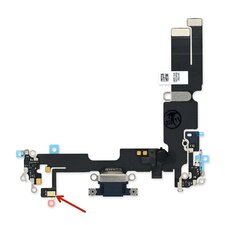
iFixit doesn't have a guide to that repair, but the Spanish site Nadie Me Llama Gallina has just what you need. Of course it's in Spanish but if you use it with the Chrome browser's translation feature, it becomes quite usable no matter what your native language is.
Manuals / Apple iPhone 14 Plus / Charging Flex Cable - Nobody Calls Me Chicken
As a side note just for the sake of completeness, the upper microphone is located on the sensor cable assembly that's mounted on the screen. Here's a picture showing where the microphone is located.
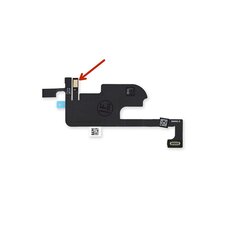
Here's the guide you'd need to use to replace it; note that this is a screen replacement guide, but if you follow it exactly and swap out the sensor assembly instead of the screen, it'll accomplish exactly what you need to do.
이 답변이 도움이 되었나요?
Hello thanks for a nice comment I already tried cleaning when I make a call in speacker phone or not they still can’t hear me does that mean both microphone are broken?
@brett97 That does complicate the issue; it's unlikely that both microphones would go bad at the same time. If I had to guess I would suspect an issue with the audio chip instead.
At this point my next step would be to back up the phone, put it in DFU mode and do a complete firmware restore back to factory settings. That should eliminate any possibility of a software issue.
평판: 1
3
3
Well I will suggest you to update the app to it latest version and also update your phone to its latest version it will also help you in fixing the issue.
이 답변이 도움이 되었나요?
Thanks for trying to help I am already updated to to latest iOS and my snap chat is updated any time I make calls they just hear static and if I try to record on snap it’s just static too I replaced the loud speacker people told me that could be it because it’s one of the microphones but I can’t find a part for the other speacker / microphone on the small side on the button of
the iPhone 14 Plus
평판: 13
2
1
Thanks what makes it’s less or more confusing idk why but some times randomly works do you still think this is the software issue and could I just go to batteries plus or my phone provider to make sure all my stuff is backed up
이 답변이 도움이 되었나요?
Through my camera my mic is working on Snapchat it is not working and if I call Siri doesn’t work too and it was working before it fell, when I call it’s sometimes people hear me through the mic
이 답변이 도움이 되었나요?
David, your phone has multiple microphones, one at the bottom of the phone that's used for phone calls and Siri, and the other at the top that gets used when recording videos and when you're on speakerphone. Assuming it's the lower mic that's died, you'd need to replace the charging port flex cable assembly that it's mounted on. This guide shows how to do that.
Manuals / Apple iPhone 14 Plus / Charging Flex Cable - Nobody Calls Me Chicken
When I make calls they can’t hear me or when I’m on Snapchat they can’t hear me they just hear static what part would fix this
이 답변이 도움이 되었나요?
My iPhone 14 Plus the phone mic work but voice memos video and FaceTime mic is muffled
이 답변이 도움이 되었나요?
지난 24시간: 4
지난 7일: 32
지난 30일: 151
전체 시간: 2,080



댓글 1개
Thanks what makes it’s less or more confusing idk why but some times randomly works do you still think this is the software issue and could I just go to batteries plus or my phone provider to make sure all my stuff is backed up
Brett97 의