주요 콘텐츠로 건너뛰기

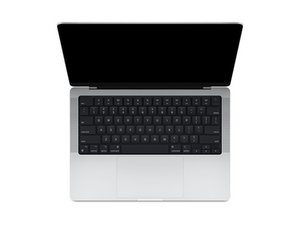
Apple이 설계한 M1 Pro 및 M1 Max SoC를 탑재하고 올해 10월에 출시된 14인치 MacBook Pro에 대한 수리 안내서 및 분해 정보입니다. 모델 A2442.

replacing the battery MacBook Pro (14 Zoll, 2021)

Hi everyone,

I’m considering replacing the battery of my MacBook Pro 14” (2021, M1 Max) myself at some point.

I’ve heard that the batteries in this model might be “paired” with the logic board, similar to iPhones, and that after a DIY replacement in macOS it may show “Service Recommended” even if the battery is technically working fine.

My questions are:

Is it true that Apple pairs the battery with the hardware on the 2021 MacBook Pro?

If yes – can an iFixit battery still be used normally, just with that warning message?

Has anyone experienced whether the “Service Recommended” message stays permanently or goes away?

Thanks!

이 질문에 답하기 저도 같은 문제가 있습니다

좋은 질문입니까?

점수 0

댓글 1개:

Your question revolves around Apples use of parts serialization! Similar to what John Deere has done with their tractors. Within the iFixit news feed via the link above you can learn more on it.

As far as the MacBook batteries the source of the battery often times is the issue as in China you'll find people rebuilding batteries by MacGyver a bunch of cells from old sets which are still good into a workable battery! But the BMC logic within this battery will still report a worn out battery.

Using a fresh battery with a clean BMC chip will get you 90% of the way but sometimes SMC logic won't refresh the OS temp files so you need to manual delete them.

댓글 달기

답변 1개

I would start off checking my battery to see how it is. The best tool for this is this one CoconutBattery Apple's Battery Heath sadly comes up short as it doesn't show the deeper details or even explain Cycles or how age and usage effects the battery. As of late Apple has finally realized batteries which are mostly tethered to a charger really shouldn't be pushed to 100% instead 80% and it's a settable option in iOS and iPadOS (I'm still running an older macOS release that doesn't offer it, hopefully it's available in the newer releases). Basically, when the Cycle count is getting close to 1000 the battery is on its last legs and the run time will be diminished quite substantially and that's independent of the age and usage which needs to be added in. A battery's life is about four y=to five years depending on your usage as the batteries chemistry degrades over time.

OK, enough of that, so while iPhones and iPads started the parts serialization mess. Apple has slowly walked back from it with some parts Batteries being one of them only reporting it's not a genuine Apple part and that includes MacBook batteries. So there shouldn't be any issues using an iFixit battery MacBook Pro 14" (A2442, A2779, A2918) Battery and it's guide MacBook Pro 14" 2021 배터리 교체 the other option would be getting the battery from Apples Self Repair option if it's available where you live Apple Self Repair Site

You may need to manually delete the cached OS values afterwards. But let's just get the battery replaced for now.

Replace a 6068 mAh A2519 battery compatible with the 2021 MacBook Pro 14" model A2442 or 2023 models A2779 and A2918 laptop. 69.9 Watt Hours (Wh). 11.46 Volts (V). 이미지

제품

MacBook Pro 14" (A2442, A2779, A2918) Battery

$99.99

이 답변이 도움이 되었나요?

점수 0
댓글 달기

답변을 추가하세요

m.hofmann 영원히 감사할 것입니다.
조회 통계:

지난 24시간: 3

지난 7일: 32

지난 30일: 118

전체 시간: 372
