Hi I just received a Dell Inspiron 1750 from 2008 It turns on, but is stuck at an error screen upon boot (see attatched image) It says press F1 to continue, but pressing F1 just makes a beep sound How do I fix it? Also, it has 4GB RAM installed, I want to know if it supports 8GB or higher
Either the battery is missing, dead or there's a motherboard problem.
You could try a power refresh to reset the BIOS and check what that does.
Disconnect the charger (if connected), remove the main battery (if it is there) and then open the laptop and remove the coin cell battery from the motherboard.
Go to p.17 (of 56 pdf) of theowner manual to view the procedure to remove the coin cell battery.
When it is out, measure its voltage. If it is <2.5V DC or if the battery is >4-5 years old, replace it. The battery type can be found on the battery itself. Usually it is a CR2032 which is available most everywhere e.g. supermarkets.
Press and hold the laptop's Power button for a full 30 seconds and then release it.
Reinsert the coin cell battery (or replacement coin cell battery) onto the motherboard, reassemble the laptop, insert the main battery, connect the charger and check.
Best that I can find is that the laptop supports a maximum of 8GB of DDR2 6400 800MHz sodimm ram over 2 slots i.e. 2 x 4GB
이 토론글을 스크롤하여 댓글을 달 적절한 위치를 찾으세요. 그런 다음 "이 게시글에 댓글 달기"를 클릭하여 댓글을 이동하세요.
댓글 11개:
The main battery is practically dead. This is a 17 year old laptop
But what is confusing is that when my friend's dad gave it to me, we test booted it first. We saw the same screen, but pressing (or according to Dell, "striking") F1 skipped past the screen and into Windows 10 Pro, and were using it like normal
After giving back the old hard drive and swapping it for my own spare drive, it became stuck on this screen


 6
6  1
1 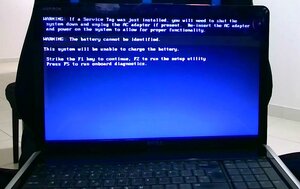

 1.6k
1.6k 