주요 콘텐츠로 건너뛰기

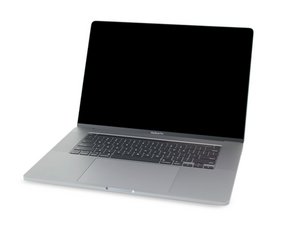
2019년 11월에 출시된 MacBook Pro 16''의 수리 안내서 및 분해 정보입니다. 모델 A2141, EMC 3347.

LCD is finished, what are the options if any?

Someone asking me about their 2019 model MBP, it has an LCD issue, not sure what exactly but I guess it requires a complete display assembly. Does this lose any function if buying a replacement or swapping one from another unit same of the same year. Not so familiar on these 'newer' models. I guess it's 'Flexgate'?
Block Image

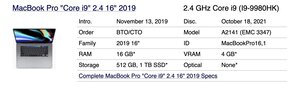
MBP 16.2" with 2.4 GHz i9 / Radeon Pro 5500M / 32 GB RAM / 512 GB Storage

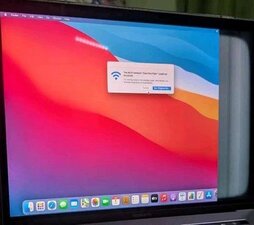
Around 1/8 of the screen is grayed out and the LCD flickers
Block Image

@danj for the good news :)

답변되었습니다! 답변 보기 저도 같은 문제가 있습니다

좋은 질문입니까?

점수 0
댓글 달기

답변 1개

선택된 해법

Per the guide "Although we’ve successfully tested this procedure using original Apple replacement displays, Apple’s T2 chip may prevent aftermarket displays from working correctly, and your MacBook Pro may not boot as a result."

I've only used known real Apple displays from used systems. But that was a good year ago. It is a delicate job it's easy to damage the antenna units and its screws. The lid angle sensor and ribbon cable can be easily damaged and you do need to reuse it.

Here's the guide MacBook Pro 16" 2019 스크린 교체

이 답변이 도움이 되었나요?

점수 1

댓글 7개:

Yeah it is not good news I know, good spec model bits the dust.....

@danj Going by the picture is this a 'Flexgate or 'Dustgate' issue with the cable or the actual LCD? And can opening and closing the display too much cause an LCD issue where no signal or power is going to particular area. I am considering to grab this dirt cheap as the tech guy has repaired these LVDS cables many times extending them so they don't rub anymore.

@livfe - Sorry no it's not FlexGate which was a 2016/17problem as Apple's engineers made the backlight flex cable a bit short with the needed thicker copper traces they became brittle! So as they moved they would fatigue!

DustGate is a more regional issue!related to the fine grit in the blown around dust. So in an arid and/or sandy area one would see this Vs a grass or forested areas as the soils (grit) would be held firm to the ground Vs deserts or large exposed soil. You will often see the black paint on the ribbon rubbed off and using a good magnifier or microscope (Michael Scope) you would see the erosion of the top insulator surface. So either the touching of the metal frame or the ribbon fine traces would short out and/or with a severe case fully cutting the traces so they are frayed out.

So we can remove both of these as your issue here as the symptoms don't align.

@danj That was not was I hoping for :( OK, thanks for clarifying this for me, the 2019 model then has 3 choices, A complete new display assembly, go headless, or die......

So while I'm not anti preventative we do need to have a clear understanding of the failure before we attempt unnecessary alterations.

The older Unibody systems (LVDS based signaling) was an analog carrier design (think back to the old days of Rabbit Ear antenna TV's you had to move about to get a good image on your TV) today's signaling is much more advanced! So while its also analog it's not a single voice trying to carry so much data as that tended to fail. Today we are multi-voiced! Using digital signaling. This is where Apple's work with DisplayPort morphed into eDP and iDP signaling! Think how a bus carries a bunch of people so when it gets a flat tire everyone onboard is stuck! Now if each person was on their own bike only one person would be affected by a flat tire. So 99% of the people would make it though! You've likely seen images of a boxy display image where blocks of data was corrupted. That's the flat tire! Here with iDP/eDP the short stub cable between the logic board & the T-CON is bad, Rare!

댓글 2개 더보기

댓글 달기

답변을 추가하세요

livfe 영원히 감사할 것입니다.
조회 통계:

지난 24시간: 0

지난 7일: 11

지난 30일: 60

전체 시간: 60
