
주요 콘텐츠로 건너뛰기
수리 커뮤니티 가입 - 계정 만들기

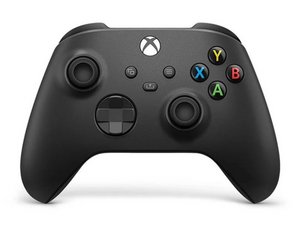
The third revision of the classic Xbox Wireless Controller was released in November 2020, bundled with the Xbox Series X and Series S. This controller is backwards compatible with previous Xbox One consoles, and PCs.

Help, my controller doesn't stay connected wired

My Xbox Series X controller (Model #1914) seems to have a loose usb c connection since whenever I connect it via a wire it ends up disconnecting a lot. However, when I manage to get it charged (again cuz of the poor wired connection) and connect it to my pc via Bluetooth it works flawlessly.

How could I reasonably fix this issue without soldering if possible?

답변되었습니다! 답변 보기 저도 같은 문제가 있습니다

좋은 질문입니까?

점수 0
댓글 달기

답변 1개

선택된 해법

Hi!

Just asking (probably you already tried it): Did you tried another USB-C cable? Would do that first.

If yes and the issue continues, it's most likely the USB-C port... The downside is, that it need to be replaced and this requires soldering...

You could replace the board completely, but this will be more expensive.

Otherwise I advise to contact a local repair shop to do it for you.

Please let us know how it goes!

이 답변이 도움이 되었나요?

점수 1

댓글 2개:

Hello! quick update, ive tried it again but now the controller itself refuses to hold a charge (using the xbox plug and play kit) but stays connected wired sometimes

update on my update i pulled up the positive and negative terminals to tighten the connection up and it now holds a charge and when i used a new cable it seems to have made it work?? although it could be a fluke since ive tried multiple cables before.

ill probably just replace the entire board with the usb c connection anyways by buying a used controller.

That is a good option as well!

Replace the board from the replacement controller. It could be battery pins related.. but those are also installed on the same board.

Please let us know how it goes :)!

댓글 달기

답변을 추가하세요

saviourr 영원히 감사할 것입니다.
조회 통계:

지난 24시간: 8

지난 7일: 23

지난 30일: 23

전체 시간: 23