소개
The guide is written so the device's speakers can be replaced if they are no longer producing sound.
You will need an opening tool for removing the cover and a soldering kit for removing the wires.
필요한 것
-
-
-
Start by bending the tablet back at the top white-colored portion to expose an opening between the back cover and the tablet body.
-
Wedge a plastic opening tool into the opening and push it down to force the back cover off.
-
Move along the top edge of the tablet and repeat the step above.
-
Pull the back cover away from the tablet body to completely remove it.
 FixBot에 문의하기
-
-
-
-
-
-
The speakers are located towards the bottom left and bottom right corners of the tablet.
-
If not already done, remove the black tape holding the wires down.
-
Wedge a spudger underneath the speaker in its socket, near where the wires are connected. You can then pry out the speakers.
-
-
-
You will need a soldering/desoldering kit to desolder the 4 leads where the speakers connect to the circuit board.
-
-


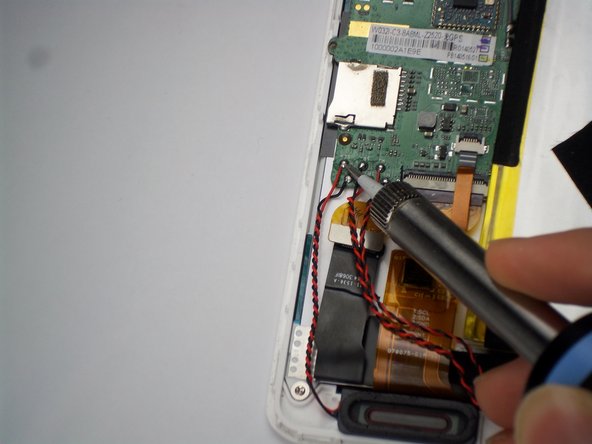
To reassemble your device, follow these instructions in reverse order.

팀

Baylor, Team 4-1, Williams Spring 2015 Baylor, Team 4-1, Williams Spring 2015 회원
BU-WILLIAMS-S15S4G1
3 회원들
안내서 48개를 작성함
