주요 콘텐츠로 건너뛰기
수리 커뮤니티 가입 - 계정 만들기

Alienware AW610M Motherboard Replacement

필요한 것

  1. Alienware AW610M Motherboard Replacement, Battery: 1 단계, 이미지 3개 중 1개 Alienware AW610M Motherboard Replacement, Battery: 1 단계, 이미지 3개 중 2개 Alienware AW610M Motherboard Replacement, Battery: 1 단계, 이미지 3개 중 3개
    • Power off the mouse and disconnect any wired connections.

  2. Alienware AW610M Motherboard Replacement: 2 단계, 이미지 2개 중 1개 Alienware AW610M Motherboard Replacement: 2 단계, 이미지 2개 중 2개
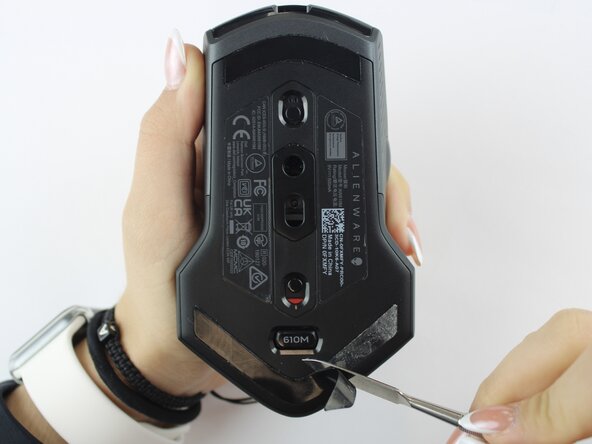
    • Use a spudger to gently lift and remove the old mouse feet.

    • If the feet are sticky, try lifting slowly from one corner to avoid tearing them.

    • Be careful not to scratch the mouse surface or damage the plastic housing.

  3. Alienware AW610M Motherboard Replacement: 3 단계, 이미지 2개 중 1개 Alienware AW610M Motherboard Replacement: 3 단계, 이미지 2개 중 2개
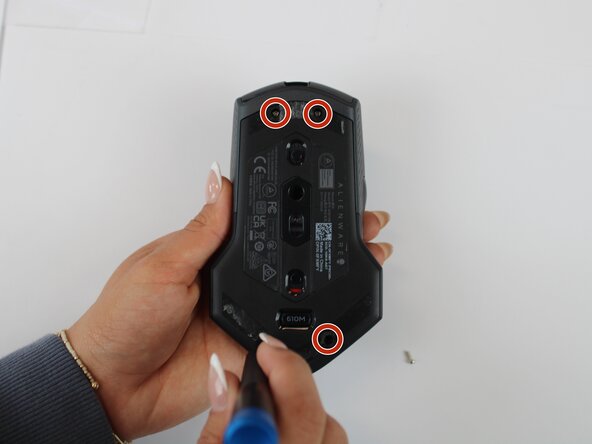
    • Remove the four 6.5 mm screws using a Y1 Tri-Point screwdriver.

  4. Alienware AW610M Motherboard Replacement: 4 단계, 이미지 2개 중 1개 Alienware AW610M Motherboard Replacement: 4 단계, 이미지 2개 중 2개
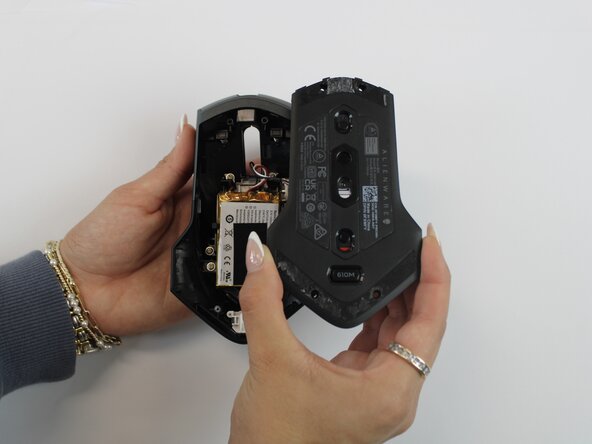
    • Using an opening tool, gently pry apart the two halves of the mouse case. Start at the seam and work your way around until the housing is separated.

    • Don't pull the halves completely apart, as internal wires still connect them.

  5. Alienware AW610M Motherboard Replacement: 5 단계, 이미지 3개 중 1개 Alienware AW610M Motherboard Replacement: 5 단계, 이미지 3개 중 2개 Alienware AW610M Motherboard Replacement: 5 단계, 이미지 3개 중 3개
    • Remove the battery pack inside the mouse.

    • If you are having trouble, use a small flat tool to help ease it out.

    • The battery is lightly glued to the mouse, so ease it out gently to avoid breaking the battery or wiring

  6. Alienware AW610M Motherboard Replacement: 6 단계, 이미지 2개 중 1개 Alienware AW610M Motherboard Replacement: 6 단계, 이미지 2개 중 2개
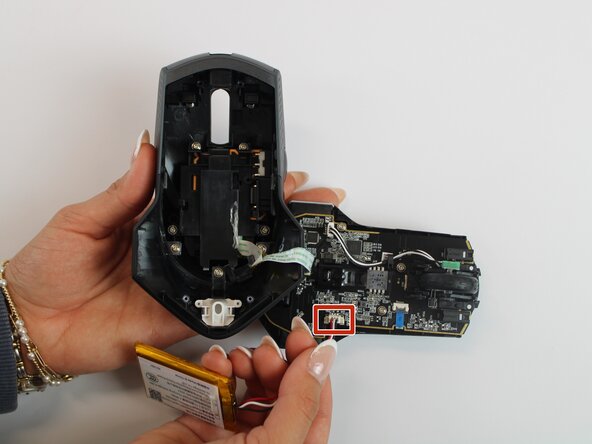
    • Remove the old battery from its spot. Lift the wire connector away from the mainboard to disconnect it.

    • Make sure all wires are inside the mouse before sealing it shut for easy reassembly.

  7. Alienware AW610M Motherboard Replacement, Motherboard: 7 단계, 이미지 2개 중 1개 Alienware AW610M Motherboard Replacement, Motherboard: 7 단계, 이미지 2개 중 2개
    • Remove the single 5.4 mm screw using a Phillips #1 screwdriver.

    • Detach the cable connector, and remove the scroll wheel.

    • Gently detach the last connector using your fingers.

    • Be careful when unplugging all connectors to prevent tearing them.

  8. Alienware AW610M Motherboard Replacement: 8 단계, 이미지 2개 중 1개 Alienware AW610M Motherboard Replacement: 8 단계, 이미지 2개 중 2개
    • Detach the blue ribbon that connects the motherboard to the shell casing.

    • Using a Phillips #1 screw driver, remove two 5.4 mm screws to detach the motherboard from the base shell casing.

  9. Alienware AW610M Motherboard Replacement: 9 단계, 이미지 3개 중 1개 Alienware AW610M Motherboard Replacement: 9 단계, 이미지 3개 중 2개 Alienware AW610M Motherboard Replacement: 9 단계, 이미지 3개 중 3개
    • Gently detach the motherboard using your fingers.

결론

To reassemble your device, follow these instructions in reverse order.

작성자

3다른 기여자 명과 함께

Sherlyn Herman

회원 가입일: 09/24/25

97 평판

안내서 1개를 작성함

Texas Tech, Team 46-4, Johansen Fall 2025 Texas Tech, Team 46-4, Johansen Fall 2025 회원

TTU-JOHANSEN-F25S46G4

4 회원들

안내서 5개를 작성함

0가이드 댓글

댓글 쓰기

조회 통계:

지난 24시간: 0

지난 7일: 1

지난 30일: 23

전체 시간: 97