주요 콘텐츠로 건너뛰기

Astro Mixamp USB Port Replacement

필요한 것

  1. Astro Mixamp USB Port Replacement, Panel Dial: 1 단계, 이미지 2개 중 1개 Astro Mixamp USB Port Replacement, Panel Dial: 1 단계, 이미지 2개 중 2개
    • Grip the dial tightly and pull straight off the device.

    • Repeat for the second dial

  2. Astro Mixamp USB Port Replacement: 2 단계, 이미지 2개 중 1개 Astro Mixamp USB Port Replacement: 2 단계, 이미지 2개 중 2개
    이 단계에 사용된 도구:
    Tweezers
    $4.99
    • Using tweezers, remove the spacer nuts and washers from each dial post.

  3. Astro Mixamp USB Port Replacement, Outer Casing: 3 단계, 이미지 2개 중 1개 Astro Mixamp USB Port Replacement, Outer Casing: 3 단계, 이미지 2개 중 2개
    • Before opening your device, ensure the device is not on or connected to the charging cable.

    • Insert a plastic opening tool into the seam between the rubber foot and plastic casing.

    • Pull the rubber foot free of the plastic casing.

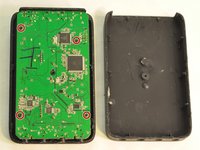
  4. Astro Mixamp USB Port Replacement: 4 단계, 이미지 1개 중 1개
    • Use a screwdriver to remove the screw from the rear casing.

  5. Astro Mixamp USB Port Replacement: 5 단계, 이미지 1개 중 1개
    • Gently lift the rear casing from the device.

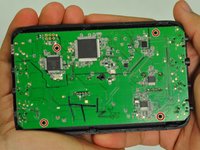
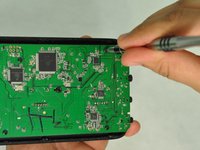
  6. Astro Mixamp USB Port Replacement, Motherboard: 6 단계, 이미지 3개 중 1개 Astro Mixamp USB Port Replacement, Motherboard: 6 단계, 이미지 3개 중 2개 Astro Mixamp USB Port Replacement, Motherboard: 6 단계, 이미지 3개 중 3개
    • Remove the four screws that hold the motherboard in place.

    • Only touch the edges of the motherboard. Touching the surface can damage the motherboard.

  7. Astro Mixamp USB Port Replacement: 7 단계, 이미지 1개 중 1개
    • Gently pull the motherboard from the front cover.

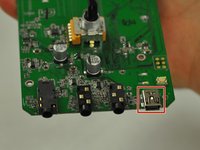
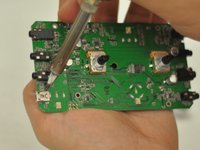
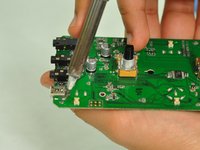
  8. Astro Mixamp USB Port Replacement, USB Port: 8 단계, 이미지 3개 중 1개 Astro Mixamp USB Port Replacement, USB Port: 8 단계, 이미지 3개 중 2개 Astro Mixamp USB Port Replacement, USB Port: 8 단계, 이미지 3개 중 3개
    • Press the tip of a hot soldering iron to the USB connection to melt the solder.

    • Use a nylon spudger to lift the USB from the solder.

    • Repeat for each of the four USB connections.

    • For more help on soldering, refer to this guide: 연결부 납땜 및 납제거 방법

결론

To reassemble your device, follow these instructions in reverse order.

다른 2명이 해당 안내서를 완성하였습니다.

작성자

1다른 기여자 명과 함께

Hope Burns

회원 가입일: 10/29/16

741 평판

안내서 5개를 작성함

4가이드 댓글

What port is used as a replacement?

jonescoleman1738 - 답글

Did you ever identify an appropriate replacement port?

Lepec -

something was broken out of the port of the USB connection

MoreZemtor - 답글

Will this method work with the 2015 tr mixamp?

jeffreyalvarez9 - 답글

댓글 쓰기

조회 통계:

지난 24시간: 2

지난 7일: 7

지난 30일: 27

전체 시간: 8,390