소개
This guide will help you replace the RAM in an Asus A53S.
Random-Access Memory (RAM) stores the short-term data that the laptop needs to operate properly.
Before using this guide, make sure to review the troubleshooting page.
If your laptop is running slow, you may want to upgrade your RAM. The Asus A53S can be upgraded to up to 8GB of memory.
Make sure to power off your laptop completely, disconnect from any external power source, and remove the battery before beginning the process.
필요한 것
-
-
-
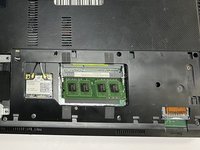
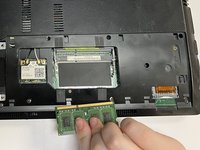
Gently push the metal clips apart, allowing the RAM to pop up.
-
Remove the top RAM.
-
-
-
Gently push the metal clips apart, allowing the RAM to pop up.
-
Remove the bottom RAM.
-


 FixBot에 문의하기


To reassemble your device, follow these instructions in reverse order.
다른 2명이 해당 안내서를 완성하였습니다.

팀

University of North Texas, Team 3-1, Saru Jimmy Fall 2022 University of North Texas, Team 3-1, Saru Jimmy Fall 2022 회원
UNT-SARU JIMMY-F22S3G1
4 회원들
안내서 6개를 작성함
