소개
This guide will show you how to replace the Asus ZenPad Z8 Tablet's back-camera. If you have followed all of the other steps on the troubleshooting guide and they've failed to solve the problem, replacing the camera may be your best bet.
필요한 것
-
-
-
Turn off the power. The tablet has a hard power switch located on the right side.
 FixBot에 문의하기
-
-
-
Unscrew the screws located on the bottom and use the prying tool to open the tablet.
-
-
-
-
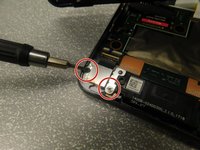
Unscrew the two screws that hold the camera onto the back cover. Each screw is located on either side of the camera.
-
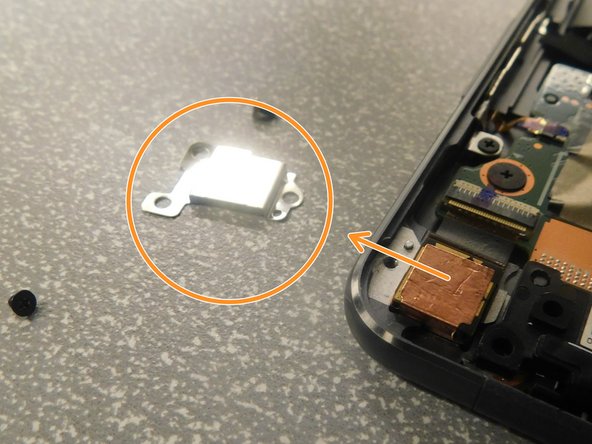
Remove the camera cover piece.
-
-
-
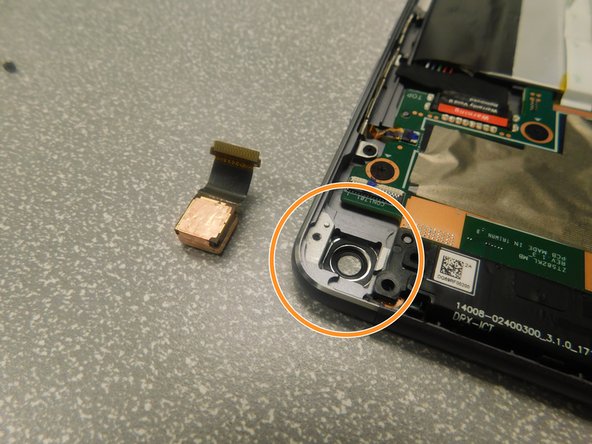
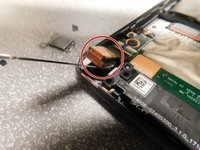
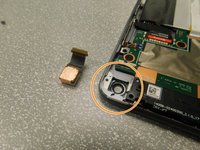
Use a prying tool to separate the camera, then pull to completely remove it.
-
Reinstall the new camera, camera cover, and screws.
-
-



To reassemble your device, follow these instructions in reverse order.
다른 한 분이 해당 안내서를 완성하였습니다.

팀

Gateway, Team S1-G4, Saknee Spring 2019 Gateway, Team S1-G4, Saknee Spring 2019 회원
GCC-SAKNEE-S19S1G4
4 회원들
안내서 1개 작성
