주요 콘텐츠로 건너뛰기
수리 커뮤니티 가입 - 계정 만들기

Comfort Zone CZ6C Switch Replacement

필요한 것

  1. Comfort Zone CZ6C Switch Replacement, Switch: 1 단계, 이미지 3개 중 1개 Comfort Zone CZ6C Switch Replacement, Switch: 1 단계, 이미지 3개 중 2개 Comfort Zone CZ6C Switch Replacement, Switch: 1 단계, 이미지 3개 중 3개
    • Make sure to unplug the Comfort Zone CZ6C before cutting any wires.

    • Before replacing your switch, learn how to solder using the How To Solder and Desolder Connections Guide.

    • Start with the fan on its back. Unscrew the back panel to expose the internal wiring.

  2. Comfort Zone CZ6C Switch Replacement: 2 단계, 이미지 2개 중 1개 Comfort Zone CZ6C Switch Replacement: 2 단계, 이미지 2개 중 2개
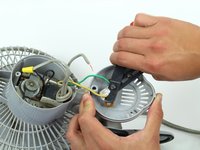
    • Remove the plastic cover on the switch by pulling it apart from the the back panel.

  3. Comfort Zone CZ6C Switch Replacement: 3 단계, 이미지 1개 중 1개
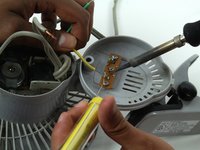
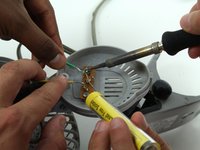
    • Use the soldering iron with caution. Don't touch the tip of the soldering iron to avoid the risk of injury.

    • This step can be made easier with the help of a partner to hold the wiring while you desolder the connection.

    • Disconnect the gray power wire from the switch by desoldering the connection.

  4. Comfort Zone CZ6C Switch Replacement: 4 단계, 이미지 2개 중 1개 Comfort Zone CZ6C Switch Replacement: 4 단계, 이미지 2개 중 2개
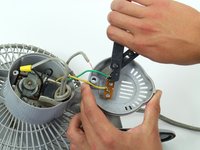
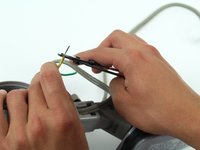
    • Cut the green and yellow wire as close to the switch connection as possible.

  5. Comfort Zone CZ6C Switch Replacement: 5 단계, 이미지 3개 중 1개 Comfort Zone CZ6C Switch Replacement: 5 단계, 이미지 3개 중 2개 Comfort Zone CZ6C Switch Replacement: 5 단계, 이미지 3개 중 3개
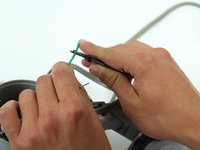
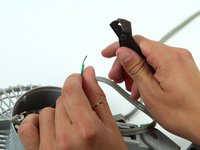
    • Strip the green and yellow wire about two centimeters from where it was just cut.

  6. Comfort Zone CZ6C Switch Replacement: 6 단계, 이미지 3개 중 1개 Comfort Zone CZ6C Switch Replacement: 6 단계, 이미지 3개 중 2개 Comfort Zone CZ6C Switch Replacement: 6 단계, 이미지 3개 중 3개
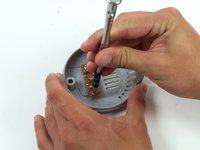
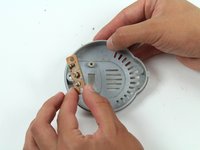
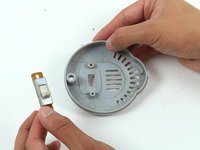
    • Unscrew the switch from the back panel and remove it.

  7. Comfort Zone CZ6C Switch Replacement: 7 단계, 이미지 3개 중 1개 Comfort Zone CZ6C Switch Replacement: 7 단계, 이미지 3개 중 2개 Comfort Zone CZ6C Switch Replacement: 7 단계, 이미지 3개 중 3개
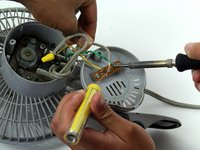
    • After replacing the switch, resolder the gray power cord, the green wire, and the yellow wire.

결론

To reassemble your device, follow these instructions in reverse order.

다른 한 분이 해당 안내서를 완성하였습니다.

작성자

4다른 기여자 명과 함께

James Abundis

회원 가입일: 04/08/15

169 평판

안내서 1개를 작성함

Cal Poly, Team 17-5, Forte Spring 2015 Cal Poly, Team 17-5, Forte Spring 2015 회원

CPSU-FORTE-S15S17G5

4 회원들

안내서 7개를 작성함

1가이드 댓글

I need a replacement switch for a Comfort Zone CZ40 heater. Can you help?

Michael Drasic - 답글

댓글 쓰기

조회 통계:

지난 24시간: 2

지난 7일: 9

지난 30일: 36

전체 시간: 2,564