소개
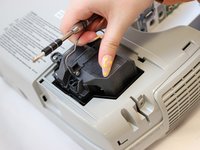
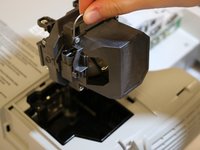
Use this guide to replace an old or damaged lamp inside of the Epson Powerlite 460 projector.
The lamp creates light that produces vivid image displays from the projector. When the lamp exceeds its lifespan or is damaged, the image display can be dim or distorted. In some cases, no image display will appear at all.
Make sure to review the troubleshooting guide; sometimes a distorted image is caused by another issue and does not require the lamp's replacement.
When you are disposing of your old lamp, make sure to check your state’s requirements for disposal of the lamp since it does contain mercury.
Once you have installed the new lamp, remember to reset the lamp timer in the menu.
필요한 것


 FixBot에 문의하기


To reassemble your device, follow these instructions in reverse order.

팀

Eastern Washington University, Team 1-1, Carnegie Spring 2022 Eastern Washington University, Team 1-1, Carnegie Spring 2022 회원
EWU-CARNEGIE-S22S1G1
3 회원들
안내서 10개를 작성함
