주요 콘텐츠로 건너뛰기
수리 커뮤니티 가입 - 계정 만들기

HP Stream 8 Speakers Replacement

필요한 것

    1. HP Stream 8 Speakers Replacement, Midframe: 1 단계, 이미지 1개 중 1개
      • Use your nail or a spudger to pry the back cover off of the device.

      댓글 쓰기

    2. HP Stream 8 Speakers Replacement: 2 단계, 이미지 1개 중 1개
      • Slide your finger around the rest of the back cover, lifting it completely off of the device.

      댓글 쓰기

    3. HP Stream 8 Speakers Replacement: 3 단계, 이미지 1개 중 1개
      • Remove ten Phillips #00 screws from the inside cover.

      댓글 쓰기

    4. HP Stream 8 Speakers Replacement: 4 단계, 이미지 1개 중 1개
      • Pry up the inside cover the same way as in the first step.

      댓글 쓰기

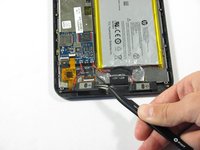
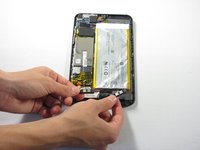
    1. HP Stream 8 Speakers Replacement, Speakers: 5 단계, 이미지 2개 중 1개 HP Stream 8 Speakers Replacement, Speakers: 5 단계, 이미지 2개 중 2개
      이 단계에 사용된 도구:
      Tweezers
      $4.99
      • Locate the two speakers at the bottom of the device.

      • Remove the two speakers by prying them out using a pair of tweezers.

      • Detach the red and black power wiring from the device and pull the speakers entirely out of the HP Stream 8.

      • Remember where the red and black wiring is connected to the device.

      • The power wires are soldered to the device and will be difficult to detach.

      댓글 쓰기

    2. HP Stream 8 Speakers Replacement: 6 단계, 이미지 1개 중 1개
      • Grab the two replacement speakers and the soldering iron.

      • Locate where the red and black power wiring previously connected to the device.

      • Attach and re-solder the red and black power wiring.

      • For soldering help, check out iFixit's How to Solder and Desolder Connections guide.

      댓글 쓰기

결론

To reassemble your device, follow these instructions in reverse order.

취소: 해당 안내서를 완성하지 않았습니다.

다른 한 분이 해당 안내서를 완성하였습니다.

작성자

9다른 기여자 명과 함께

Nick Miller

회원 가입일: 04/11/16

669 평판

안내서 6개를 작성함

Cal Poly, Team 34-14, Maness Spring 2016 Cal Poly, Team 34-14, Maness Spring 2016 회원

CPSU-MANESS-S16S34G14

4 회원들

안내서 12개를 작성함

0가이드 댓글

댓글 쓰기

조회 통계:

지난 24시간: 0

지난 7일: 10

지난 30일: 33

전체 시간: 642