소개
The CPU fan supports the HP Z2 Mini G3 (Model No. 1LE81UP#ABA) as a cooling mechanism. In case of malfunction or damage, this guide can direct end users to steps required to replace this cooling fan.
Before starting this replacement, check out our troubleshooting guide. The issue with your device may not require a replacement.
Be sure that the power is off and the A/C power cord has been disconnected before working on interior components. Removing hardware while the power is on could damage the device.
Components inside the device are also subject to static damage, so try and work on a hard surface to reduce this risk.
-
-
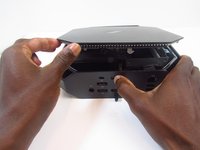
Slide and hold the latch in the direction of the engraved arrow (to the right).
-
-
-
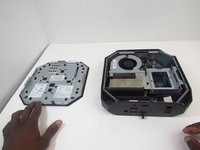
While holding the latch, lift the access panel upwards and towards yourself and set it aside upside-down.
-
-
-
-
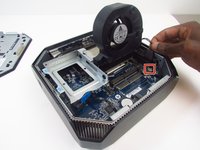
Rotate the device so the front side is facing you (the side with the power button) and locate the CPU fan.
-
-
-
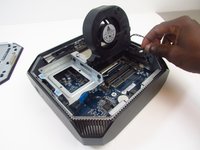
Carefully disconnect the CPU fan by pulling out the wires from the motherboard.
-
-
-
Swing the fan back down and carefully unhook the CPU fan notches by pulling each tab away from the heat sink holes.
-

 FixBot에 문의하기






To reassemble your device, follow these instructions in reverse order.
다른 한 분이 해당 안내서를 완성하였습니다.

팀

Embry-Riddle Aeronautical University, Team S16-G4, Branham Spring 2020 Embry-Riddle Aeronautical University, Team S16-G4, Branham Spring 2020 회원
ERAU-BRANHAM-S20S16G4
3 회원들
안내서 6개를 작성함
