주요 콘텐츠로 건너뛰기
수리 커뮤니티 가입 - 계정 만들기

Nikon D7000 Mirror Box & Viewfinder Replacement

필요한 것

    1. Nikon D7000 Mirror Box & Viewfinder Replacement, Motherboard: 1 단계, 이미지 1개 중 1개
      • When loosening the screws, start pressing the screwdriver firmly for the first 1-2 turns (highest torque) until the screw is 'unlocked'. Failing to do so can damage the screw head and make it impossible to disengage that screw.

      • Remove the following 5 screws securing the bottom cover to the camera body:

      • Four 6 mm J000 screws.

      • One 8 mm J000 screw (under lens mount).

      댓글 쓰기

    2. Nikon D7000 Mirror Box & Viewfinder Replacement: 2 단계, 이미지 1개 중 1개
      • Remove three 6 mm J000 screws from under the battery cover.

      댓글 쓰기

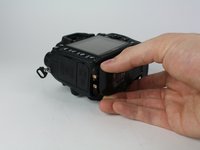
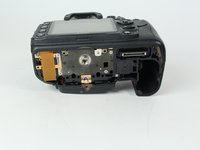
    3. Nikon D7000 Mirror Box & Viewfinder Replacement: 3 단계, 이미지 2개 중 1개 Nikon D7000 Mirror Box & Viewfinder Replacement: 3 단계, 이미지 2개 중 2개
      • Gently pull the bottom cover off of the camera body.

      댓글 쓰기

    4. Nikon D7000 Mirror Box & Viewfinder Replacement: 4 단계, 이미지 1개 중 1개
      • Remove the following screws from the port area:

      • Two 3.5 mm J000 screws.

      • One 6 mm J000 screw (right above ports).

      댓글 쓰기

    5. Nikon D7000 Mirror Box & Viewfinder Replacement: 5 단계, 이미지 1개 중 1개
      이 단계에 사용된 도구:
      Tweezers
      $4.99
      • Peel the rear rubber piece off with tweezers.

      댓글 쓰기

    6. Nikon D7000 Mirror Box & Viewfinder Replacement: 6 단계, 이미지 1개 중 1개
      • Remove one 4.25 mm J000 screw from behind the rear rubber piece.

      댓글 쓰기

    7. Nikon D7000 Mirror Box & Viewfinder Replacement: 7 단계, 이미지 1개 중 1개
      • Pull the eyepiece cover up to remove it.

      댓글 쓰기

    8. Nikon D7000 Mirror Box & Viewfinder Replacement: 8 단계, 이미지 1개 중 1개
      • Remove two 6 mm J000 screws from behind the eyepiece cover.

      • On D7100 models, there is an additional screw holding the back plate on. This screw is located in the diopter (dial with + - on it). This screw can be accessed by peeling up this sticker on the diopter.

      댓글 쓰기

    9. Nikon D7000 Mirror Box & Viewfinder Replacement: 9 단계, 이미지 1개 중 1개
      • Open the SD card cover by pushing slightly down with your thumb and sliding up.

      댓글 쓰기

    10. Nikon D7000 Mirror Box & Viewfinder Replacement: 10 단계, 이미지 1개 중 1개
      • Remove four 6 mm J000 screws that secure the SD card cover.

      댓글 쓰기

    11. Nikon D7000 Mirror Box & Viewfinder Replacement: 11 단계, 이미지 1개 중 1개
      • Gently pull the SD card cover off.

      댓글 쓰기

    12. Nikon D7000 Mirror Box & Viewfinder Replacement: 12 단계, 이미지 1개 중 1개
      • Remove the following screws that secure the back case:

      • One 6 mm J000 screw.

      • One 3 mm J000 screw.

      댓글 쓰기

    13. Nikon D7000 Mirror Box & Viewfinder Replacement: 13 단계, 이미지 1개 중 1개
      • Carefully lift the back case off.

      댓글 쓰기

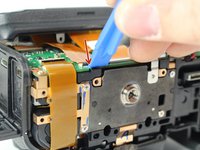
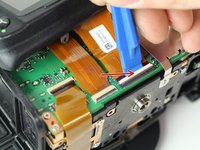
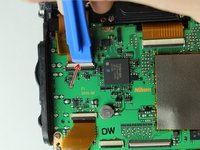
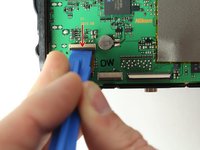
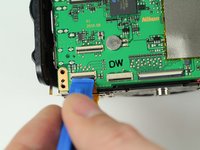
    14. Nikon D7000 Mirror Box & Viewfinder Replacement: 14 단계, 이미지 3개 중 1개 Nikon D7000 Mirror Box & Viewfinder Replacement: 14 단계, 이미지 3개 중 2개 Nikon D7000 Mirror Box & Viewfinder Replacement: 14 단계, 이미지 3개 중 3개
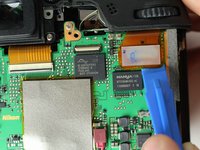
      • Disconnect the following two ribbon cables from the motherboard.

      • See our Cable Connector Guide for help with ribbon cable connectors!

      댓글 쓰기

    15. Nikon D7000 Mirror Box & Viewfinder Replacement: 15 단계, 이미지 2개 중 1개 Nikon D7000 Mirror Box & Viewfinder Replacement: 15 단계, 이미지 2개 중 2개
      • Remove the following screws securing the left motherboard shield:

      • One 2 mm J000 screw (on the bottom).

      • One 3.5 mm J000 screw (on the back).

      • Be careful of the grounding clips on the motherboard.

      댓글 쓰기

    16. Nikon D7000 Mirror Box & Viewfinder Replacement: 16 단계, 이미지 1개 중 1개
      • Gently pry and lift the left motherboard shield off.

      댓글 쓰기

    17. Nikon D7000 Mirror Box & Viewfinder Replacement: 17 단계, 이미지 1개 중 1개
      • Remove one 3.5 mm J000 screw securing the right motherboard shield.

      댓글 쓰기

    18. Nikon D7000 Mirror Box & Viewfinder Replacement: 18 단계, 이미지 1개 중 1개
      • Gently lift the right motherboard shield off with the tip of a spudger.

      댓글 쓰기

    19. Nikon D7000 Mirror Box & Viewfinder Replacement: 19 단계, 이미지 3개 중 1개 Nikon D7000 Mirror Box & Viewfinder Replacement: 19 단계, 이미지 3개 중 2개 Nikon D7000 Mirror Box & Viewfinder Replacement: 19 단계, 이미지 3개 중 3개
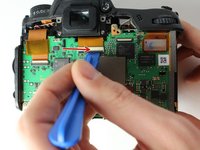
      • Disconnect remaining ribbon cables.

      댓글 쓰기

    20. Nikon D7000 Mirror Box & Viewfinder Replacement: 20 단계, 이미지 2개 중 1개 Nikon D7000 Mirror Box & Viewfinder Replacement: 20 단계, 이미지 2개 중 2개
      • Disconnect remaining ribbon cables.

      댓글 쓰기

    21. Nikon D7000 Mirror Box & Viewfinder Replacement: 21 단계, 이미지 1개 중 1개
      • Carefully disconnect the red connector with tweezers.

      댓글 쓰기

    22. Nikon D7000 Mirror Box & Viewfinder Replacement: 22 단계, 이미지 1개 중 1개
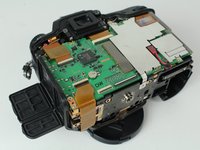
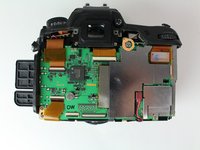
      • Remove four 3.5 mm J000 screws securing the motherboard.

      댓글 쓰기

    23. Nikon D7000 Mirror Box & Viewfinder Replacement: 23 단계, 이미지 1개 중 1개
      • Gently pull the port side cover away from the motherboard.

      댓글 쓰기

    24. Nikon D7000 Mirror Box & Viewfinder Replacement: 24 단계, 이미지 1개 중 1개
      • Lift the motherboard off.

      댓글 쓰기

    1. Nikon D7000 Mirror Box & Viewfinder Replacement, Tripod Plate: 25 단계, 이미지 1개 중 1개
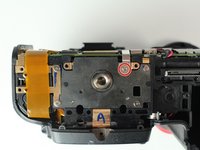
      • Remove four 6 mm J000 screws securing the tripod plate.

      댓글 쓰기

    2. Nikon D7000 Mirror Box & Viewfinder Replacement: 26 단계, 이미지 1개 중 1개
      • Carefully lift the tripod plate from the backside of the camera and slide out the grounding clip from under the lens mount.

      댓글 쓰기

    1. Nikon D7000 Mirror Box & Viewfinder Replacement, Image Sensor: 27 단계, 이미지 2개 중 1개 Nikon D7000 Mirror Box & Viewfinder Replacement, Image Sensor: 27 단계, 이미지 2개 중 2개
      • Disconnect black and white speaker cable.

      댓글 쓰기

    2. Nikon D7000 Mirror Box & Viewfinder Replacement: 28 단계, 이미지 1개 중 1개
      • Remove three 6 mm J000 screws securing the image sensor.

      댓글 쓰기

    3. Nikon D7000 Mirror Box & Viewfinder Replacement: 29 단계, 이미지 1개 중 1개
      • Carefully lift the image sensor plate out of the camera.

      댓글 쓰기

    1. Nikon D7000 Mirror Box & Viewfinder Replacement, Shutter Assembly: 30 단계, 이미지 1개 중 1개
      • Manually pop up flash by inserting a screw driver to the left of the viewfinder and pressing on the metal lever.

      • It won't take much pressure. Press carefully and the flash will pop up when you find the right spot.

      댓글 쓰기

    2. Nikon D7000 Mirror Box & Viewfinder Replacement: 31 단계, 이미지 1개 중 1개
      • Remove two 5 mm J000 screws from under the flash.

      댓글 쓰기

    3. Nikon D7000 Mirror Box & Viewfinder Replacement: 32 단계, 이미지 1개 중 1개
      • Remove two 3 mm J000 screws securing the front cover.

      댓글 쓰기

    4. Nikon D7000 Mirror Box & Viewfinder Replacement: 33 단계, 이미지 2개 중 1개 Nikon D7000 Mirror Box & Viewfinder Replacement: 33 단계, 이미지 2개 중 2개
      • Remove the front cover.

      댓글 쓰기

    5. Nikon D7000 Mirror Box & Viewfinder Replacement: 34 단계, 이미지 1개 중 1개
      • Carefully remove the port cover.

      댓글 쓰기

    6. Nikon D7000 Mirror Box & Viewfinder Replacement: 35 단계, 이미지 1개 중 1개
      • Deroute the microphone cable.

      댓글 쓰기

    7. Nikon D7000 Mirror Box & Viewfinder Replacement: 36 단계, 이미지 1개 중 1개
      • Remove one 4 mm J000 screw from the front.

      댓글 쓰기

    8. Nikon D7000 Mirror Box & Viewfinder Replacement: 37 단계, 이미지 1개 중 1개
      • Remove one 8.5 mm J000 screw from the battery compartment.

      댓글 쓰기

    9. Nikon D7000 Mirror Box & Viewfinder Replacement: 38 단계, 이미지 1개 중 1개
      • Remove the grip carefully.

      댓글 쓰기

    10. Nikon D7000 Mirror Box & Viewfinder Replacement: 39 단계, 이미지 1개 중 1개
      • Remove one 4 mm J000 screw securing the top case (under right strap hook).

      댓글 쓰기

    11. Nikon D7000 Mirror Box & Viewfinder Replacement: 40 단계, 이미지 1개 중 1개
      • Remove one 4 mm J000 screw securing the top case (under left strap hook).

      댓글 쓰기

    12. Nikon D7000 Mirror Box & Viewfinder Replacement: 41 단계, 이미지 1개 중 1개
      • Remove the sticker covering the diopter adjust screw.

      댓글 쓰기

    13. Nikon D7000 Mirror Box & Viewfinder Replacement: 42 단계, 이미지 1개 중 1개
      • Remove one 8.0 mm J000 screw.

      • Remove the Diopeter Adjust.

      댓글 쓰기

    14. Nikon D7000 Mirror Box & Viewfinder Replacement: 43 단계, 이미지 1개 중 1개
      • Remove the top case.

      댓글 쓰기

    15. Nikon D7000 Mirror Box & Viewfinder Replacement: 44 단계, 이미지 1개 중 1개
      • Remove the Black, Yellow, Green cable from the top case board.

      댓글 쓰기

    16. Nikon D7000 Mirror Box & Viewfinder Replacement: 45 단계, 이미지 3개 중 1개 Nikon D7000 Mirror Box & Viewfinder Replacement: 45 단계, 이미지 3개 중 2개 Nikon D7000 Mirror Box & Viewfinder Replacement: 45 단계, 이미지 3개 중 3개
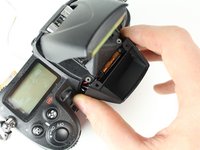
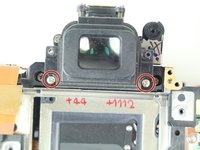
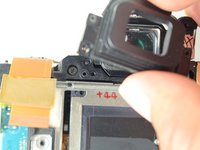
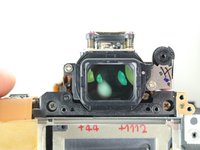
      • Remove two 6.5 mm J000 screws securing the viewfinder.

      • Remove the viewfinder cover.

      댓글 쓰기

    17. Nikon D7000 Mirror Box & Viewfinder Replacement: 46 단계, 이미지 1개 중 1개
      • Remove one 3 mm J000 screw from the bottom left side of the camera.

      댓글 쓰기

    18. Nikon D7000 Mirror Box & Viewfinder Replacement: 47 단계, 이미지 1개 중 1개
      • Remove two 6 mm J000 screws from the left of the shutter.

      댓글 쓰기

    19. Nikon D7000 Mirror Box & Viewfinder Replacement: 48 단계, 이미지 1개 중 1개
      • Remove two 6.5 mm J000 screws from beneath the lens mount.

      댓글 쓰기

    20. Nikon D7000 Mirror Box & Viewfinder Replacement: 49 단계, 이미지 1개 중 1개
      • Remove two screws from just below and to the sides of the viewfinder.

      댓글 쓰기

    21. Nikon D7000 Mirror Box & Viewfinder Replacement: 50 단계, 이미지 1개 중 1개
      • Remove one 5 mm J000 screw from the top right of the camera.

      댓글 쓰기

    22. Nikon D7000 Mirror Box & Viewfinder Replacement: 51 단계, 이미지 1개 중 1개
      • Carefully peel back ribbon cable on the bottom left of camera.

      댓글 쓰기

    23. Nikon D7000 Mirror Box & Viewfinder Replacement: 52 단계, 이미지 2개 중 1개 Nikon D7000 Mirror Box & Viewfinder Replacement: 52 단계, 이미지 2개 중 2개
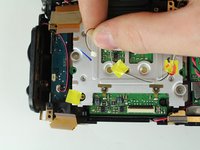
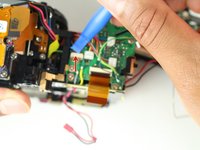
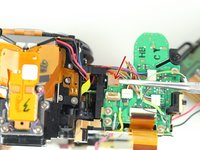
      • Remove the left front ribbon cable from top right of circuit board.

      댓글 쓰기

    24. Nikon D7000 Mirror Box & Viewfinder Replacement: 53 단계, 이미지 1개 중 1개
      • Remove all three wire connectors.

      댓글 쓰기

    25. Nikon D7000 Mirror Box & Viewfinder Replacement: 54 단계, 이미지 1개 중 1개
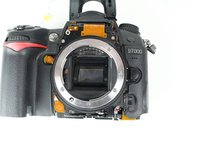
      • Separate the shutter assembly from the camera body.

      댓글 쓰기

    1. Nikon D7000 Mirror Box & Viewfinder Replacement, Mirror Box & Viewfinder: 55 단계, 이미지 1개 중 1개
      • Pull out ribbon cable from circuit asembly near front left of device.

      댓글 쓰기

    2. Nikon D7000 Mirror Box & Viewfinder Replacement: 56 단계, 이미지 1개 중 1개
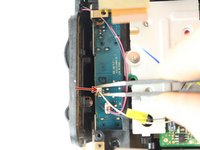
      • Desolder red & black power leads.

      • Check out our soldering guide for help!

      댓글 쓰기

    3. Nikon D7000 Mirror Box & Viewfinder Replacement: 57 단계, 이미지 1개 중 1개
      • Disconnect ribbon cable at the top right of camera.

      댓글 쓰기

    4. Nikon D7000 Mirror Box & Viewfinder Replacement: 58 단계, 이미지 1개 중 1개
      • Disconnect ribbon cable at top right of camera.

      댓글 쓰기

    5. Nikon D7000 Mirror Box & Viewfinder Replacement: 59 단계, 이미지 1개 중 1개
      • Disconnected ribbon cable at rear right of viewfinder.

      댓글 쓰기

    6. Nikon D7000 Mirror Box & Viewfinder Replacement: 60 단계, 이미지 1개 중 1개
      • Remove the two 5.5mm J000 screws

      댓글 쓰기

    7. Nikon D7000 Mirror Box & Viewfinder Replacement: 61 단계, 이미지 1개 중 1개
      • Remove the 5.5 mm J000 screw.

      댓글 쓰기

    8. Nikon D7000 Mirror Box & Viewfinder Replacement: 62 단계, 이미지 1개 중 1개
      • Remove the viewfinder from the mirror box assembly.

      댓글 쓰기

결론

To reassemble your device, follow these instructions in reverse order.

취소: 해당 안내서를 완성하지 않았습니다.

다른 5명이 해당 안내서를 완성하였습니다.

작성자

3다른 기여자 명과 함께

Thomas Willson

회원 가입일: 04/02/15

453 평판

안내서 1개를 작성함

Cal Poly, Team 24-6, Lancaster Spring 2015 Cal Poly, Team 24-6, Lancaster Spring 2015 회원

CPSU-LANCASTER-S15S24G6

3 회원들

안내서 6개를 작성함

1가이드 댓글

now I know why my camera failed,, the motor overheated

sir francis - 답글 공유
댓글 쓰기

조회 통계:

지난 24시간: 2

지난 7일: 12

지난 30일: 62

전체 시간: 13,826