주요 콘텐츠로 건너뛰기
수리 커뮤니티 가입 - 계정 만들기

Samsung Captivate Camera Assembly Replacement

필요한 것

  1. Samsung Captivate Camera Assembly Replacement, Battery: 1 단계, 이미지 1개 중 1개
    • Remove the back cover by pressing on the bottom section of the phone and sliding the bottom piece downward.

    • Lift up the back cover.

    댓글 쓰기

  2. Samsung Captivate Camera Assembly Replacement: 2 단계, 이미지 1개 중 1개
    • Place your finger on the bottom of the battery and lift to remove.

    댓글 쓰기

  3. Samsung Captivate Camera Assembly Replacement: 3 단계, 이미지 1개 중 1개
    • Replace the old battery with the new one.

    댓글 쓰기

  4. Samsung Captivate Camera Assembly Replacement, Rear Case: 4 단계, 이미지 1개 중 1개
    • Insert the spudger underneath the bottom section of the phone.

    • Gently lift and push the spudger to slide the bottom section down to reveal two hidden screws.

    댓글 쓰기

  5. Samsung Captivate Camera Assembly Replacement: 5 단계, 이미지 1개 중 1개
    • Remove the six 4.5mm #000 Phillips screws.

    댓글 쓰기

  6. Samsung Captivate Camera Assembly Replacement: 6 단계, 이미지 3개 중 1개 Samsung Captivate Camera Assembly Replacement: 6 단계, 이미지 3개 중 2개 Samsung Captivate Camera Assembly Replacement: 6 단계, 이미지 3개 중 3개
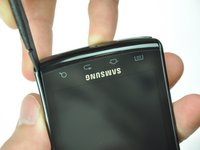
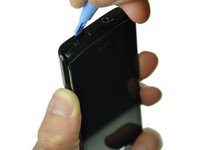
    • Starting at a bottom corner, use the spudger to separate the rear case from the front display.

    • Move the spudger towards the top on both sides. The plastic opening tool is easier to use for this step.

    • Be careful when detaching the top. Free each side, stopping short of the center of the cover. Apply backward pressure on both corners with a finger applying pressure on the center, and slide the whole back cover toward the bottom of the device. Note: forcing the cover can result in cracked plastic.

    댓글 쓰기

  7. Samsung Captivate Camera Assembly Replacement: 7 단계, 이미지 1개 중 1개
    • Separate the rear case from the phone.

    댓글 쓰기

  8. Samsung Captivate Camera Assembly Replacement, Camera Assembly: 8 단계, 이미지 1개 중 1개
    • Use the spudger tool to pry up the chip labeled "NEC." This releases the chip.

    댓글 쓰기

  9. Samsung Captivate Camera Assembly Replacement: 9 단계, 이미지 1개 중 1개
    • Gently lift the camera assembly out of the plastic housing.

    댓글 쓰기

결론

To reassemble your device, follow these instructions in reverse order.

취소: 해당 안내서를 완성하지 않았습니다.

다른 3명이 해당 안내서를 완성하였습니다.

작성자

4다른 기여자 명과 함께

Drew Bentz

회원 가입일: 09/22/11

565 평판

안내서 5개를 작성함

Cal Poly, Team 20-25, Maness Fall 2011 Cal Poly, Team 20-25, Maness Fall 2011 회원

CPSU-MANESS-F11S20G25

3 회원들

안내서 9개를 작성함

2가이드 댓글

Is this for the front facing camera

tracy mann - 답글 공유

No, this is for the rear facing camera. The Samsung Captivate does not have a front facing camera.

Will Budney - 답글 공유

댓글 쓰기

조회 통계:

지난 24시간: 1

지난 7일: 10

지난 30일: 52

전체 시간: 2,777