주요 콘텐츠로 건너뛰기

Samsung Galaxy Note 3 Battery Replacement

필요한 것

  1. Samsung Galaxy Note 3 Battery Replacement, Remove the rear case: 1 단계, 이미지 1개 중 1개
    • Insert a fingernail or plastic opening tool in the gap between the rear case and the base of the phone.

  2. Samsung Galaxy Note 3 Battery Replacement, Remove Case from the Base: 2 단계, 이미지 2개 중 1개 Samsung Galaxy Note 3 Battery Replacement, Remove Case from the Base: 2 단계, 이미지 2개 중 2개
    • Slide your fingernail or plastic opening tool along the edge of the rear case.

    • Lift the case gently from the base.

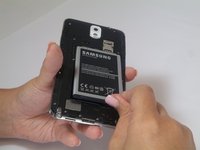
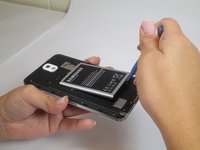
  3. Samsung Galaxy Note 3 Battery Replacement, Battery: 3 단계, 이미지 2개 중 1개 Samsung Galaxy Note 3 Battery Replacement, Battery: 3 단계, 이미지 2개 중 2개
    • Insert a fingernail or plastic opening tool into the small gap between the battery and the phone base.

    • Lift the battery out of its recess.

결론

To reassemble your device, follow these instructions in reverse order.

다른 47명이 해당 안내서를 완성하였습니다.

작성자

9다른 기여자 명과 함께

Sam Goldheart

회원 가입일: 10/18/12

474,965 평판

안내서 538개를 작성함

4가이드 댓글

I am a technological genius! ( with your help )

kenharper - 답글

Why need a opening tool lol

ycwei982 - 답글

Mon telephone ne garde pas la charge plus d'une heure même si j'ai changé la batterie mais reste le même problème

Sarah Sarah - 답글

댓글 쓰기

조회 통계:

지난 24시간: 0

지난 7일: 10

지난 30일: 54

전체 시간: 17,103