주요 콘텐츠로 건너뛰기
수리 커뮤니티 가입 - 계정 만들기

Samsung Gear Fit Screen Replacement

필요한 것

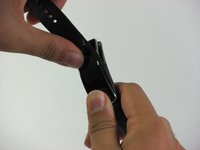
  1. Samsung Gear Fit Screen Replacement, Watch Band: 1 단계, 이미지 2개 중 1개 Samsung Gear Fit Screen Replacement, Watch Band: 1 단계, 이미지 2개 중 2개
    • Place your thumbs on the ends of the screen.

    • Push the watch outward while pulling the band away from the watch.

    댓글 쓰기

  2. Samsung Gear Fit Screen Replacement, Screen: 2 단계, 이미지 1개 중 1개
    • Heating the device with a hair dryer may warp the screen or damage the device. It it preferable to use an iOpener for this step.

    • For step-by-step instructions on using an iOpener, see the iOpener Instructions.

    • Use a hair dryer, heat gun, or an iOpener to heat the Gear Fit for 1-2 minutes until it is hot to the touch.

    댓글 쓰기

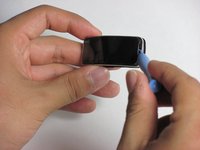
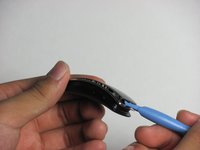
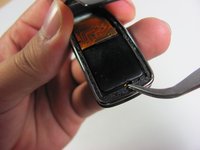
  3. Samsung Gear Fit Screen Replacement: 3 단계, 이미지 3개 중 1개 Samsung Gear Fit Screen Replacement: 3 단계, 이미지 3개 중 2개 Samsung Gear Fit Screen Replacement: 3 단계, 이미지 3개 중 3개
    • The screen is connected to the device by a ribbon cable on the left side with the power button facing you. Do not try to completely separate the screen from the device yet, and be careful.

    • Gently pry the screen loose using a plastic opening tool.

    • If the screen doesn't easily come loose, more heating may be required

    댓글 쓰기

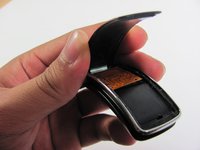
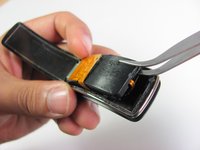
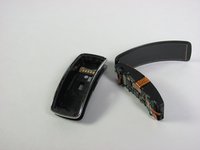
  4. Samsung Gear Fit Screen Replacement: 4 단계, 이미지 3개 중 1개 Samsung Gear Fit Screen Replacement: 4 단계, 이미지 3개 중 2개 Samsung Gear Fit Screen Replacement: 4 단계, 이미지 3개 중 3개
    이 단계에 사용된 도구:
    Tweezers
    $4.99
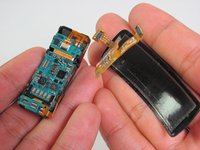
    • Using tweezers as a lever, pry the inner assembly out of the external casing.

    • This will be harder than removing the screen. Moderate force may be required.

    댓글 쓰기

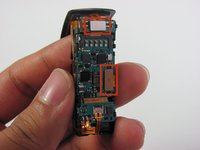
  5. Samsung Gear Fit Screen Replacement: 5 단계, 이미지 3개 중 1개 Samsung Gear Fit Screen Replacement: 5 단계, 이미지 3개 중 2개 Samsung Gear Fit Screen Replacement: 5 단계, 이미지 3개 중 3개
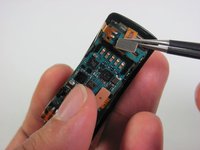
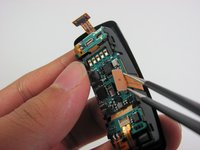
    • Disconnect the ribbon cables connecting the screen to the motherboard by lifting their metal connectors up off of the board with tweezers.

    댓글 쓰기

  6. Samsung Gear Fit Screen Replacement: 6 단계, 이미지 2개 중 1개 Samsung Gear Fit Screen Replacement: 6 단계, 이미지 2개 중 2개
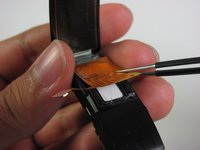
    • Gently peel the screen assembly up and away from the device using tweezers.

    댓글 쓰기

결론

To reassemble your device, follow these instructions in reverse order.

취소: 해당 안내서를 완성하지 않았습니다.

다른 17명이 해당 안내서를 완성하였습니다.

작성자

5다른 기여자 명과 함께

Nathan Powell

회원 가입일: 04/24/14

1,584 평판

안내서 3개를 작성함

Cal Poly, Team 11-49, Amido Spring 2014 Cal Poly, Team 11-49, Amido Spring 2014 회원

CPSU-AMIDO-S14S11G49

4 회원들

안내서 4개를 작성함

28가이드 댓글

Hi!

Thank you very much for this tuto. But wher can we acquire the screen ???

Thanks a lot.

AB

aaa - 답글 공유

Where can you buy replacement screen?

Yele Olaniyi - 답글 공유

I'm also finding it difficult to buy a replacement screen too. Has anyone discovered some. I thought this website was selling some not too long ago. Any more coming in?

Rochelle - 답글 공유

Hi guys,

is it possible to detach the display unit from the protective plastic cover (I think it's not glass) ?

alexxtodorov - 답글 공유

Does anyone know where to get the replacement screen?

MrGratts - 답글 공유

댓글 쓰기

조회 통계:

지난 24시간: 0

지난 7일: 7

지난 30일: 53

전체 시간: 54,597