소개
This guide will show how to replace the two cooling fans inside the Sytem76 Serval WS. It will show step by step how to remove the old fans and safely install new fans. You will need to replace the fans if they stop working.
If the fans are working after the repair and your laptop continues to overheat, you may need to clean the fans or replace thermal paste.
필요한 것
-
-
Unscrew and remove the 4 screws circled in red. Then remove the plastic bottom panel.
 FixBot에 문의하기
-
-
-
Remove the numbered screws in order to safely remove the heatsink
-
Remove the heatsink to access the cooling fans.
-
-
-
-
Unscrew and remove the screws circled in red, 3 screws per fan.
-
Next unplug the 4-pin power connectors, marked in orange squares.
-
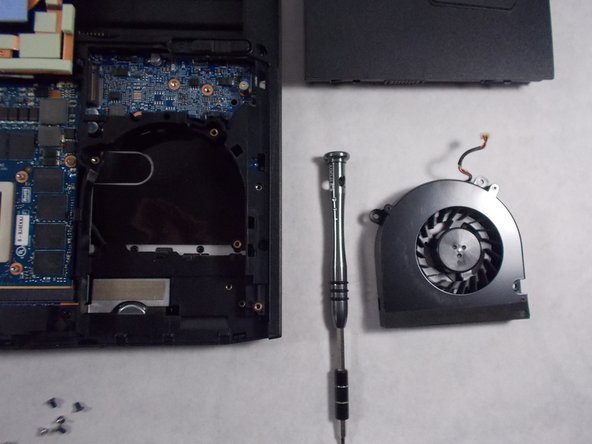
Remove the cooling fans by lifting them up and out of the casing.
-
-
-
Plug in the 4-pin power connectors of the new fans.
-
Insert and tighten 3 screws per fan.
-
-
-
If needed, clean off the old thermal paste from the CPU, GPU, and heatsink using isopropyl alcohol and a microfiber cloth. Apply new thermal paste before reassembly.
-
Clean the dust from the heatsink fins.
-


To reassemble your device, follow these instructions in reverse order.

팀

UMass Dartmouth, Team S1-G4, Valliere Spring 2019 UMass Dartmouth, Team S1-G4, Valliere Spring 2019 회원
UMASSD-VALLIERE-S19S1G4
4 회원들
안내서 3개를 작성함
