주요 콘텐츠로 건너뛰기
수리 커뮤니티 가입 - 계정 만들기

iRobot Roomba 692 Battery Replacement

필요한 것

  1. iRobot Roomba 692 Battery Replacement, Battery: 1 단계, 이미지 3개 중 1개 iRobot Roomba 692 Battery Replacement, Battery: 1 단계, 이미지 3개 중 2개 iRobot Roomba 692 Battery Replacement, Battery: 1 단계, 이미지 3개 중 3개
    • To access the iRobot Roomba 692 battery compartment, flip your iRobot Roomba 692 upside down.

    • Using the Phillips #0 screwdriver, remove the 4.0mm screw in the center of the yellow side brush and lift the part out.

  2. iRobot Roomba 692 Battery Replacement: 2 단계, 이미지 3개 중 1개 iRobot Roomba 692 Battery Replacement: 2 단계, 이미지 3개 중 2개 iRobot Roomba 692 Battery Replacement: 2 단계, 이미지 3개 중 3개
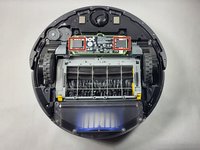
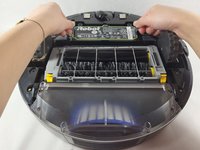
    • Use a Phillips #0 screwdriver to remove the four black 3.5 mm screws on the bottom panel.

    • Remove the bottom panel.

    • Can't find the screws? Refer to the red circles in the Step 1 image.

  3. iRobot Roomba 692 Battery Replacement: 3 단계, 이미지 3개 중 1개 iRobot Roomba 692 Battery Replacement: 3 단계, 이미지 3개 중 2개 iRobot Roomba 692 Battery Replacement: 3 단계, 이미지 3개 중 3개
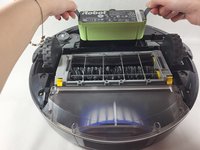
    • Using the black tabs on both short ends of the battery pack, gently pull the battery up and out of its slot.

결론

To reassemble your device, follow these instructions in reverse order.

다른 한 분이 해당 안내서를 완성하였습니다.

작성자

1다른 기여자 명과 함께

Demi Muyuela

회원 가입일: 03/14/23

507 평판

안내서 5개를 작성함

UMass Dartmouth, Team 1-4, Shaddix Spring 2023 UMass Dartmouth, Team 1-4, Shaddix Spring 2023 회원

UMASSD-SHADDIX-S23S1G4

4 회원들

안내서 5개를 작성함

0가이드 댓글

댓글 쓰기

조회 통계:

지난 24시간: 0

지난 7일: 10

지난 30일: 34

전체 시간: 1,714