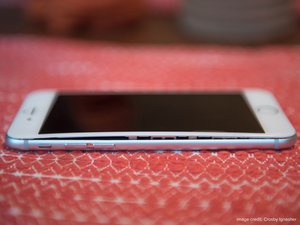
화재 안전
기기가 매우 뜨겁거나 이상한 냄새가 나는 경우 배터리를 분리하지 마세요. 기기에서 활발하게 연기가 난다면 주변의 가연성 물건들을 치우고 유독가스를 마시지 않도록 주의하세요. 배터리에는 흡입 시 유해한 화학물질이 섞여 있으므로 가능하면 해당 공간을 환기하세요.
만약 배터리에 불이 붙었다면 화재 상황처럼 대응하세요. 기기를 옮길 수 없다면 모래로 불을 덮고 거품, ABC, 또는 CO2 소화기로 식히거나, 물을 많이 뿌리거나, 내화성 용기로 덮는 시도를 하고 안전 거리를 두세요.
만약 안전이 보장된다면 금속 주걱과 같은 내화성 도구를 사용하여 금속 오븐 판 또는 콘크리트 바닥과 같은 내화성 표면으로 기기를 밀어주세요. 배터리가 자체적으로 소진될 수 있는 안전한 장소로 기기를 실외로 옮기고 안전한 거리에서 살펴보세요.
경고
리튬-이온 배터리는 부풀어 오른 여부와 관계없이 부적절하게 취급할 경우 화재가 발생하거나 폭발할 수 있습니다. 전자 기기에서 배터리를 분리할 때는 조심히 진행해야 하며 위험 부담은 전적으로 사용자의 책임입니다. 만약 안전하게 제거할 수 있는지 의심되면, 기기 전원을 끄고 격리한 다음 전문 수리 기술자에게 문의하세요.
부풀어 오른 배터리를 분리하는 것은 위험이 따를 수 있지만 기기 내부에 부풀어 오른 배터리를 그대로 두는 것도 위험할 수 있습니다. 잠재적 기기 및 신체 손상을 방지하려면 부풀어 오른 배터리로 기기를 작동하지 마세요. 이 지침은 부풀어 오른 배터리를 분리하는 모범 사례를 제공하지만 안전한 수리를 보장하지는 않습니다. 확신이 없다면 기기 전원을 끄고, 내화성 용기에 넣어 수리 전문가에게 가져가서 고장난 배터리를 분리해달라고 요청하세요. 부풀어 오른 배터리 분리는 지체하지 마세요. 부풀어 오른 배터리를 iFixit에서 구매한 경우, 배터리를 분리하기 전후 사진을 찍어서 고객 서비스 팀에 문의하여 보증 신청 또는 교체를 요청하세요.

배터리가 부풀어 오르면 어떻게 됩니까?
리튬-이온 배터리는 화학 반응을 통해 전력을 생산합니다. 배터리가 오래되면 이 화학 반응이 더 이상 완벽하게 완료되지 않아 가스를 배출하여 (가스 방출) 배터리를 부풀어 오르게 합니다. 또한 배터리 내부 층들이 (손상이나 결함으로 인해) 적절한 분리를 유지하지 못하면 가스 방출, 팽창 및 화재가 발생할 수 있습니다. 가스 방출의 다른 일반적인 원인으로는 제조 과정에서 발생한 결함, 과충전, 과도한 온도 등이 있으며, 이 모든 것이 셀 내부에서 원치 않는 화학 반응을 일으킬 수 있습니다.
부풀어 오른 배터리 식별 방법
기기 검사하기

As batteries swell, they expand and push other components out of the way. Oftentimes a display, button, or trackpad will be pushed out of normal alignment. You may have a swollen battery if your phone case doesn’t fit as well as it used to, or there’s a new gap between components, or buttons have become stiff or hard to push, or your device has more give than usual and feels “squishy.”
냄새로 식별하기
안전할 때만 냄새로 식별해 보세요! 절대로 위험한 물질에 얼굴을 가까이 대지 말고 깊게 숨을 들이쉬지 말며—배터리 근처 공기가 퍼져 나가게 하세요. 단 냄새, 금속 냄새 또는 아세톤 냄새가 날 수 있는데, 이는 부풀어 오른 배터리에서 새어 나오는 배터리 가스일 수 있습니다.
배터리 검사하기

Image Credit: George Christidis
If your device is easy to open without disturbing the battery (check the battery replacement guide to see!), like a MacBook or iPhone, you can open the device and visually inspect the battery for puffiness. If the battery has a loose or wrinkly wrapping, is more rounded than square, or appears lifted out of its recess, it is swollen.
부풀어 오른 배터리를 안전하게 분리하는 방법
시작하기 전에
배터리가 부풀어 올랐다고 의심되면 기기를 충전하지 마세요. 가능한 한 배터리를 많이 방전하세요—이는 화재 위험을 줄입니다.
스스로 보호하기
연기가 확산되도록 환기가 잘 되는 곳에서 작업하세요. 보안경을 착용하세요—풀 고글이 이상적이지만 안전 안경이라도 사용하는 것이 없는 것보다는 낫습니다. 배터리 화학 물질이 피부에 닿지 않도록 장갑을 착용하세요. 손상된 배터리를 안전하게 옮길 수 있도록 길고 뭉툭한 집게를 준비하세요.
작업 환경 준비하기

In the event that the battery does begin to combust or leak, you need to have a safe place to store it. Work on a non-flammable surface and outside if it’s cool and dry. Prepare a fireproof container, such as a sealed metal can, metal bucket of sand, or equivalent. Water isn't the most effective option, but can be used in large quantities to extinguish a small, cellphone-sized battery (less than 15 Wh). If you work indoors, have a clear path to a place outside where the battery reaction may safely run itself out.
배터리 분리하기
Once the above precautions have been taken, you can start removing the battery. For the most part, you can follow your device’s battery replacement guide, but extra care should be taken to avoid damaging the battery during removal. If the battery is glued in place, we recommend starting with a solvent like iFixit’s adhesive remover, high-concentration isopropyl alcohol, or acetone. The solvent will minimize the need to pry against or flex the battery. Keep in mind that acetone may cause damage to plastic parts, and all solvents should be used as sparingly as possible—they are flammable. Only use plastic tools, and avoid anything sharp enough to puncture the battery wrapping—puncturing the battery can lead to dangerous fires. If at any point the smell increases, the device begins to heat up, or any smoke appears, put the device outside, or in a fireproof container, and wait for the symptoms to dissipate before trying again.
부풀어 오른 배터리 처리하기
Once the battery has been removed, it needs to be safely disposed of. Do not throw batteries into trash or recycling bins. Do not put/store the battery in water. If the battery is warm, smelly or smoking, put it outside away from flammable materials, or in a fireproof container, and wait for the symptoms to dissipate. When safe, take the battery to a local e-waste collection site; refer to our e-waste page to find one in your area. Do not mail the battery to an e-waste processing facility—there are strict regulations against this as the battery could cause damage in transit. In fact, never ship a battery without specific authorization and instructions as there are safety protocols that must be followed according to law.
배터리 관리하기
Batteries are consumable, and no matter how well you take care of them, they will eventually need to be replaced. That said, below are some best practices to help keep your battery healthy for longer. But, it is important to note that you cannot heal a swollen or defective battery; you can only remove it. These hints can only help prevent battery degradation.
Batteries do best with slow, controlled charging and discharging, use in moderate temperatures, and protection from shocks or damage. Though a phone or laptop battery isn’t usually being charged or discharged quickly enough for it to pose an issue, rapid charging and discharging can wear a battery out prematurely and result in some outgassing. Avoid using low quality or damaged charging cables or adapters as they risk uncontrolled, uneven, or excessive power management that can cause damage or even result in fire. Leaving your battery 100% charged or completely empty for a long period of time can also shorten your battery’s lifespan, so if you plan on storing your device without using it for a few weeks or more, charge/discharge it to about 40% and turn it off beforehand. High temperatures can also reduce battery efficiency, so try not to leave your phone in the car on a hot day. And most importantly, dropping your phone hurts your battery, too, not just your screen. Just like cars, phones are meant to flex during an accident, so even a glued-in battery can bump into nearby components when dropped, resulting in a puncture. Replace your battery if it’s damaged or no longer holds a proper charge.
TL;DR: be nice to your battery. Use it gently, and replace it if it becomes damaged or no longer holds a proper charge.
다음 번역가들에게 특별히 감사 드립니다:
100%


이 번역인들은 저희가 세상을 수리하는 데 도움을 주고 있어요! 기여하시겠습니까?
번역 시작하기 ›

댓글 79개
Leaving your device plugged in forces it to drain and charge many times an hour, which can degrade the battery - this is rubbish. If the device is plugged in the battery will usually end up fully charged - which is not ideal as about 40% charge is best for battery longevity - but it won’t drain and charge continually. Instead, once the battery is fully charged it is essentially removed from the circuit and the charger powers the device.
Using a non-certified charging cable or adapter risks uncontrolled, uneven, or excessive charging that can cause damage or even result in fire - this is not quite true. All devices contain a charge controller that prevents overcharging regardless of the charger used. However, cheap chargers may subject you to the risk of electrocution, may produce ‘noisy’ DC that reduces the performance of the touchscreen, or may themselves catch fire. A damaged charger cable can also overheat and cause a fire.
Andrew - 답글 공유
perfectly true "thumb up "
Iti Tech - 답글 공유
Depends on the design of the charging circuitry. While your statement of “battery being decoupled if fully charged” might be true on some devices, the usual (because simpler to design and cheaper due to less parts) approach is to power the device through the battery. Even if a charger is connected.
Yannik - 답글 공유
I feel that when battery is full-4.2v phone stops
current from the charger to discharge battery to
4v let's say.then again charges it to 4.2v and so on.effective way to unnecessary cycle the battery to lower its lifetime on purpose.
daniel1 lungu - 답글 공유
This is not true for mobile phones - my understanding is that they run off the battery regardless of whether they’re plugged into a charger or not.
The reason for this is that the battery is capable of delivered much greater transient current than the charger is, and there are several devices in a phone (the radio transmitter for a start) that demand high transient currents from their power source. So the phone is wired to charge the battery from the charger & power the phone from the battery - it cannot run itself from the charger. I don’t know whether the same is true for modern laptops.
Phil - 답글 공유