

Broken home button connector
Hi , i broke the small plastic that connect the home button wire and also crake the small blade. The ZIF connector is broken
what can i do now?
좋은 질문입니까?
점수
9
평판: 109
 3
3
 2
2
Hi , i broke the small plastic that connect the home button wire and also crake the small blade. The ZIF connector is broken
what can i do now?
좋은 질문입니까?
평판: 2.2k
4
4
 1
1
If it's just the tab thats broken, you can wedge something like a thin piece of plastic where the tab used to be. This will put the downward force on the connector and make the connection.
If the connector is badly damaged, you would either need to find the part and get someone who can micro-solder to replace it (I did a quick search but couldn't find the part), or you will have to replace the logic board.
이 답변이 도움이 되었나요?
평판: 41.1k
15
78
90
Hi,
If David's solution doesn't solve it, the connector on the board has to be replaced.
Since it is hard to source a good connector if at all (probably demand is not high enough, so suppliers don't make them/offer them), we choose sometimes to microsolder the connector directly to the board. It's a hack, but it's practical and it works.
이 답변이 도움이 되었나요?
평판: 49
1
Hi, this happened to me too and what I did (and it worked) was cutting 2 (or 3 I for got) small pieces of clear shipping tape just about the size (width) of the cable end. Next, tape these on top of the cable end (not the contact side) to make it thicker, then slide it back into the slot. Make sure it goes all the way in, then secure the cable by taping it to the base . Last connect the LCD cable but don't screw it in yet, then lay the LCD and the digitizer down be careful not to make the home button cable move too much. Turn on the iPad to test.
This solution saved me from a night mare when I saw a YouTube video showing that you have to remove the ZIF connector and solder a new one on.
이 답변이 도움이 되었나요?
Thank you so much for this. I used to layers of tape and it did the job. You are a life saver my friend.
평판: 1.5k
12
12
1
Purchase the replacement cable here. Besides the cable, are you saying the entire assembly is broken?
이 답변이 도움이 되었나요?
평판: 25
1
Or. Just use assistive touch in settings to have a home button on the screen. Home button will work on screen. Not ideal, but it works. I just broke my zif connector in replacing my screen. Will work for now.
이 답변이 도움이 되었나요?
지난 24시간: 3
지난 7일: 15
지난 30일: 38
전체 시간: 15,782




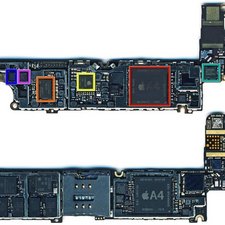
댓글 3개
Stuck with the same problem.. Have u found any solutions yet?
joel iService 의
look up onyoutube onhow to replace it, or do as i did, buy a whole new front glass screen that comes with the home button already installed then just plug the new one into the board along with the other two supplied and pree attached cables, peel the backing off the new adhesive and put the ipad back together...you can find complete sets on amazon.com
hdrjunkie 의
Not asking about the cable coming from the Home Button. The connector on the motherboard locking device broke. That’s what needs fixed or a Work-A-Round. I’ve tried aligning the pins and and placing layers of tape to hold it in place before securing it with the display cable metal securing plate that goes over all the connectors but that failed.
Jake Mathis 의