
주요 콘텐츠로 건너뛰기
수리 커뮤니티 가입 - 계정 만들기

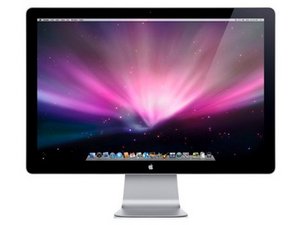
24" 화면; 내장 iSight 카메라, 마이크 및 스피커; 1920x1200 해상도. 2008년 10월 출시, 모델 번호 A1267로 식별.

Flickering band running down display

I have a band about 1 inch wide going down the right side of my Apple flat panel monitor. It looks like very thin white lines constantly flickering on the screen. Is this indicative of a bad DVI cable or a problem with the screen itself? Any information would be helpful.

이 질문에 답하기 저도 같은 문제가 있습니다

좋은 질문입니까?

점수 2
댓글 달기

답변 5개

가장 유용한 답변

I Have seen this in my brother's laptop, some forums say it is a display panel issue, others say it is a video-ram issue, try hooking up annother display, if it does the same, your computers graphics card is bad, also, which apple display, is it a Studio Display (3 Legged Picture frame like thing with powermac G4's and early G5's) or is it a Cinima Display (Newer Aluminum Displays Matching The PowerMac G5 and Mac Pro) or is it a LED Cinima Display( newer LED Backlight with a Mini-Displayport connector for MacBooks and Mac Mini's)?

이 답변이 도움이 되었나요?

점수 1

댓글 1개:

Oops, if it's external, than it won't be the video card causing the problem. I thought it was a MacBook display. Anyway, it seems like you have a bad panel.

댓글 달기

Try with a different DVI cable and different input computers to see if it is the screen. If it works with a different cable/computer then the display is fine. If the problem remains the display is broke and I think when that happens you need a new one.

Someone correct me if there is a way of repairing a LCD

이 답변이 도움이 되었나요?

점수 0
댓글 달기

the dvi cable is built into your monitor, so its hard to replace that... could be a bad pin on it or a bad inverter assembly inside. theres not much you can do to fix it without some specialized apple or lcd repair shop that deals in re cabling the screens

이 답변이 도움이 되었나요?

점수 0
댓글 달기

Have you tried attaching your display to another computer to see if the trouble still occurs?

If it doesn't you have a display driver/hardware issue that you need to address.

If it does, you are in some trouble. With a built-in cable, all you might be able to do yourself is open the monitor up and see if the connection is good on the monitor side, and reattach as necessary.

이 답변이 도움이 되었나요?

점수 0
댓글 달기

does anybody know the serial number ?

이 답변이 도움이 되었나요?

점수 0
댓글 달기

답변을 추가하세요

Dash 영원히 감사할 것입니다.
조회 통계:

지난 24시간: 1

지난 7일: 3

지난 30일: 16

전체 시간: 7,256