
주요 콘텐츠로 건너뛰기
수리 커뮤니티 가입 - 계정 만들기

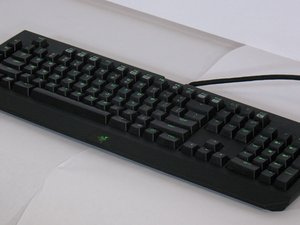
클릭형 기계식 게이밍 키보드 - 완전 프로그래밍 가능 및 5개의 매크로 키. 2010년 최초 출시.

Slow, delayed key response?

I’ve had my Blackwidow Chroma for a year or two, but only recently I noticed that, in games, the A key isn’t responding to presses in time. It can vary, from about a half-second delay on press, to a full 4 seconds, but it’s definitely there. Does anyone else have issues with this? Is this a common problem with other keyboards? How do I change out the switch if it’s compromised?

이 질문에 답하기 저도 같은 문제가 있습니다

좋은 질문입니까?

점수 1
댓글 2개

I have the same problem but with my D key, has any fix been found for this problem

의

It also happens to me but in the R key and the V key, I have cleaned it up but it stills the same I really dont know why it may be the USB port

의

댓글 달기

답변 5개

가장 유용한 답변

Can you pull keys off? Try pulling it off and see if typing with it off works well. You can also pull another key off from a key you don’t use and put it on the A key spot, doesn’t matter. Then try pressing on it and see if it works.

이 답변이 도움이 되었나요?

점수 1
댓글 달기

Just turn off the LEDs.

이 답변이 도움이 되었나요?

점수 0
댓글 달기

It works if you turn of the LED’S as Filipi said. But the problem is the key that was lagging had been assigned as a macro key. Reset that to default and you are good to go. I dont know why this happend or how.

이 답변이 도움이 되었나요?

점수 0
댓글 달기

I have used static color and it seems to have fixed the problem. I’m not sure how this keyboard is built, but I suppose it’s the keyboard’s controller that has this issue…

이 답변이 도움이 되었나요?

점수 0
댓글 달기

recently my RAZER Macro keys of Blackwidow (M1~M5 keys) input speed slow down.

(kind window slow problem - they input funtion of M1~M5keys and there are deep delays - keep Ctrl hold kind...)

but i got a hint from these answers.

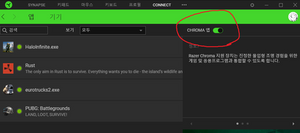
so i just turn off and back on about CHROMA color fucntion. it's fine now.

thank you guys.

이미지

이 답변이 도움이 되었나요?

점수 0
댓글 달기

답변을 추가하세요

Daniel Nicolson 영원히 감사할 것입니다.
조회 통계:

지난 24시간: 3

지난 7일: 14

지난 30일: 50

전체 시간: 12,577