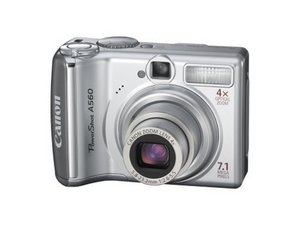

I need help setting month-date-year
cannot save month date and year have folowed instructions?
Update (04/06/2019)
idonotplan to spend cash cannon should have a free help line
좋은 질문입니까?
점수
0
cannot save month date and year have folowed instructions?
idonotplan to spend cash cannon should have a free help line
좋은 질문입니까?
평판: 862.2k
 1.5k
1.5k
 980
980
 2.4k
2.4k
this is common once the RTC (real time clock) battery is depleted. Your camera will not remember the time and date without this battery. Here are the instructions from Canon on how to change it:
1. Confirm that the camera power is turned off.
2. Slide the memory card slot / battery cover lock and open the cover.
3. Hook your nail onto the date battery holder and lightly pull up.
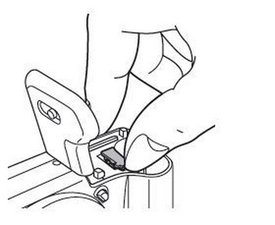
4. Remove the battery holder in the direction indicated by the arrow.
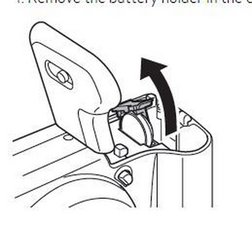
5. Remove the battery by pulling it up in the direction indicated by the arrow.
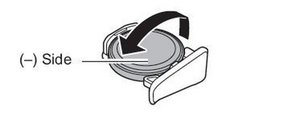
6. Insert a new battery with the (-) side facing up.
7. Replace the battery holder and close the memory card slot / battery cover.
8. When the Date/Time menu appears set the date and time.
이 답변이 도움이 되었나요?
지난 24시간: 0
지난 7일: 12
지난 30일: 27
전체 시간: 947

