주요 콘텐츠로 건너뛰기

2018년 10월 26일 출시. Models A1984, A2105, A2106, A2108. GSM 또는 CDMA / eSIM, nano-SIM 또는 dual-SIM / 64, 128, 또는 256GB / 검정색, 흰색, 파란색, 노란색, 산호색, 또는 빨간색. ("iPhone 10 R"로 발음합니다.)

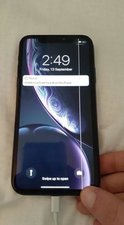
Line on screen after LCD replacement

Block Image
Block Image

Since replacing my iPhone XR screen i’ve had this black (sometimes white) line appear when pressure is applied to the bottom right corner of the screen. If i separate the screen and phone with a layer of electrical tape the issue doesn’t occur. I assume this is some sort of electrical interference but cant seem to isolate what is causing it.

Any suggestions would be much appreciated :)

이 질문에 답하기 저도 같은 문제가 있습니다

좋은 질문입니까?

점수 6
댓글 달기

답변 4개

가장 유용한 답변

There are two possibilities here; either the replacement screen is defective or you may have incorrectly assembled the screen.

If you still have access to the original screen, you could try installing that one to see if the problem persists. If it does, there may be some damage to the logic board (probably the connectors). If it doesn’t, the go through this guide to double-check your work as some screens, especially lower cost aftermarket screens can be thicker and cause issues with pressure points.

Also, was the replacement screen a “complete” screen with small parts or did you have to transfer everything over? Pre-populated parts can be problematic but transferring parts can lead to alignment issues. Do some more testing and verification and come back with more details.

Final question, is the picture of the phone innards your device or a photo from the web? It has an awful lot of scratches, markings and the battery looks like it has seen better days. Let us know if the phone has been previously repaired.

이 답변이 도움이 되었나요?

점수 4
댓글 달기

I think you need to try reconnecting the display to the phone. True, for this you will need answers and little experience in repairing such devices. Although it seems to me that it’s best for you to turn to the master who replaced the screen for you.

이 답변이 도움이 되었나요?

점수 0
댓글 달기

Most likely it’s nothing than a damaged screen, thos line are normal for damaged screen, the reconection with motherboard will chang nothing, or there is possibility of cracked pin in phone connector, but this thing is the best check on another lcd.

이 답변이 도움이 되었나요?

점수 0
댓글 달기

Hi Elisha

i Repair iPhones for a living and that is a screen faulty and Make sure the battery is disconnected because that can damage the screen.

이 답변이 도움이 되었나요?

점수 0
댓글 달기

답변을 추가하세요

Elisha Mawson 영원히 감사할 것입니다.
조회 통계:

지난 24시간: 0

지난 7일: 6

지난 30일: 33

전체 시간: 1,959