์ฃผ์š” ์ฝ˜ํ…์ธ ๋กœ ๊ฑด๋„ˆ๋›ฐ๊ธฐ
์ˆ˜๋ฆฌ ์ปค๋ฎค๋‹ˆํ‹ฐ ๊ฐ€์ž… - ๊ณ„์ • ๋งŒ๋“ค๊ธฐ

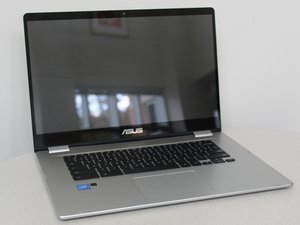
ASUS Chromebook C523NA is a Chromebook laptop manufactured by ASUS that was released on October 23, 2018 and is compatible with the Google Play Store2. It is the first ASUS Chromebook to feature a NanoEdge design, for a larger screen but more compact design.

Laptop Keys Not Working

Need help with my Chromebook keys not working. Left it unattended with a kid and I assume it was dropped, but now keys aren't working. It's a very specific half of the keyboard, with the โ€˜broken' keys going in a diagonal pattern. How do I fix this?

(Broken keys are: q, a, z, 1, c, d, e, v, f, r, b, g, t)

์ด ์งˆ๋ฌธ์— ๋‹ตํ•˜๊ธฐ ์ €๋„ ๊ฐ™์€ ๋ฌธ์ œ๊ฐ€ ์žˆ์Šต๋‹ˆ๋‹ค

์ข‹์€ ์งˆ๋ฌธ์ž…๋‹ˆ๊นŒ?

์ ์ˆ˜ 0
๋Œ“๊ธ€ ๋‹ฌ๊ธฐ

๋‹ต๋ณ€ 2๊ฐœ

๊ฐ€์žฅ ์œ ์šฉํ•œ ๋‹ต๋ณ€

If itโ€™s only the left half, Iโ€™m sorry my friend your computer has suffered a stroke ! Na lol seriously if itโ€™s a few keys not working 7/10 times i would say the culprit is water damage . Try popping off the plastic and just pushing the rubber part of the key with your finger and update me .

์ด ๋‹ต๋ณ€์ด ๋„์›€์ด ๋˜์—ˆ๋‚˜์š”?

์ ์ˆ˜ 1
๋Œ“๊ธ€ ๋‹ฌ๊ธฐ

@sinnamon going by your description it does sound like a failed keyboard. Use an external USB keyboard and see if that will work. If so replace your keyboard Asus Chromebook C523

์ด ๋‹ต๋ณ€์ด ๋„์›€์ด ๋˜์—ˆ๋‚˜์š”?

์ ์ˆ˜ 1
๋Œ“๊ธ€ ๋‹ฌ๊ธฐ

๋‹ต๋ณ€์„ ์ถ”๊ฐ€ํ•˜์„ธ์š”

Alex C ์˜์›ํžˆ ๊ฐ์‚ฌํ•  ๊ฒƒ์ž…๋‹ˆ๋‹ค.
์กฐํšŒ ํ†ต๊ณ„:

์ง€๋‚œ 24์‹œ๊ฐ„: 0

์ง€๋‚œ 7์ผ: 2

์ง€๋‚œ 30์ผ: 8

์ „์ฒด ์‹œ๊ฐ„: 713
