
주요 콘텐츠로 건너뛰기
수리 커뮤니티 가입 - 계정 만들기

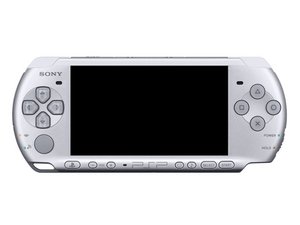
PSP 3000은 2008년 10월 15일에 미국에서 출시되었습니다.

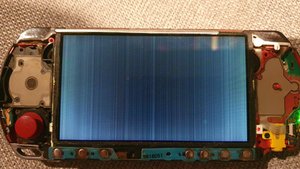
Screen has lines through it

I opened up the PSP to clean it because it was full of gunk and after putting it back together the screen has now got lines all through it.

I opened it up again to make sure the ribbon cables are all in properly and they are.

Did I press to hard on the screen when I was wiping it clean or is there something I can do to fix this?
이미지
이미지
이미지
답변되었습니다! 답변 보기 저도 같은 문제가 있습니다

좋은 질문입니까?

점수 2
댓글 2개

For closure, the replacement screen came and the issue is resolved.

의

I have a similar problem except the lines are horizontal and just on about a 1/4 of the upper part of the screen, I'm assuming I need a new screen but can someone tell me how important the lock flaps on the connections are? Because I snapped one off while trying to take the screen back off due to frustration of course..

의

댓글 달기

답변 4개

선택된 해법

@fliggle_slaps that line pattern looks like a bad screen and not the connector. IT's to fine for the connector. Replace the screen and re-evaluate.

이 답변이 도움이 되었나요?

점수 1
댓글 달기

I think i would agree with you here that the screen did broke from mishandle. I think thats how tft lcd degrades, with streaks of white lines. Also the psp 3000 is old enough to be a teenager don't beat yourself about it, save a little money and buy a replacement if you want it to be replaced. Good luck on your journey!

이 답변이 도움이 되었나요?

점수 1
댓글 달기

I would agree that this looks like a bad cable connection. I would make sure they are clean and secure again before looking at replacing screen.

이 답변이 도움이 되었나요?

점수 0

댓글 4개:

@fliggle_slaps, Specifically, you'll want to unplug the LCD and clean both sides of the connector (board and cable) with 90% or higher isopropyl alcohol. While you have it apart, take a magnifying glass and inspect the two connectors for any bent or broken pins. Bent pins can sometimes be straightened with fine tip tweezers.

의

I was really hopeful when I had a close look and saw some stuff in the connector, but even after cleaning it out and making it look flawless the issue wasn't fixed. Tried a second time and made sure the ribbon or anything else didn't have visible damage, still no luck despite all looking good.

의

The ribbon cable is bonded to the LCD glass and it's somewhat of a delicate connection and doesn't take much to damage it. Once that happens it's non-repairable. I don't know that's what happened, but if it is the only solution is a new screen, unfortunately. I hate to suggest that, but fortunately replacement screens aren't prohibitively expensive.

Have you tried all the software solutions; hard reset, restore, etc?

의

@dadibrokeit Not sure what a hard reset for a PSP is but I did restore to factory settings and upgrade the firmware, problem persists.

Only two options left are replacement screen or replacement motherboard, obviously with the screen as the more likely cause.

의

댓글 달기

I have a persistent problem. I have a PSP collection and they are all impeccable. However, I have one that I actually use and this one is giving me a headache. There are already 5 displays changed on the same PSP and they all show stripes of different shapes after a few months. This time I removed the double-sided tape that is underneath the microphone. I'll see if the stripes appear again after a short period of time. But I believe it was the double-sided tape under the microphone that pressed and contaminated the sensitive crystal chip on the display. I replaced the tape that was already sticky with epoxy resin. It was good for now.

이 답변이 도움이 되었나요?

점수 0
댓글 달기

답변을 추가하세요

Fliggle_Slaps 영원히 감사할 것입니다.
조회 통계:

지난 24시간: 5

지난 7일: 49

지난 30일: 233

전체 시간: 11,803
