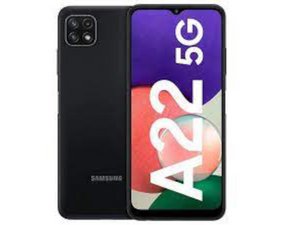

Replace touch screen display
Replace touch screen display samsung galaxy A22 5g
좋은 질문입니까?
점수
0
평판: 105
 5
5
Dear Shashinath Tiwari,
Before replacing your screen, it is important for you to identify the problem you are facing. Once you have done that, you should proceed with caution when changing the screen.
이 답변이 도움이 되었나요?
평판: 862k
1.5k
 980
980
 2.4k
2.4k
@shashinath22855 if the phone still works except the screen, it should give you a sign of life when you turn it on (vibrate and sound) etc. I would opt for a new screen,
To replace the screen display use something like this video
While you work on your phone, take lots of pictures. Once you are done with it, take those pictures and create a guide for iFixit. That will help the next person that has the same problem as you do. It's easy and fun to create these guides. https://ifixit.com/Guide/new The iFixit community will appreciate this.
이 답변이 도움이 되었나요?
평판: 1.8k
14
7
4
Firstly remove the Sim card .
Then start heating the back of the phone all around the edges of the back with a heat gun and then start moving your pry card start around the edges of the phone to remove the adhesive it will take some time be patient and do it with care (mind the 2 cables in the middle of the phone don't damage them)
When you open the back start taking of the screws of the top of the phone and bottom frame (place them somewhere you won't lose them their is a total of 15 screws)
Then with a pry card remove the inner plastic frame of the phone carefully go all around the phone take of the frame be CAREFUL
Remove the wire that's connected from the phone on the inner plastic frame
Then remove the three ribbon cables
screen and battery
Remove the speaker cover
this will show the ribbon cable Wich is connected to the screen
이 답변이 도움이 되었나요?
Next remove your old screen with a heat gun and a pry cart make sure you go all around the edges clean left out adhesive and make sure the front is properly clean
Place your new adhesive around the frame of the phone place your new screen on top of the phone and the ribbon cable inside the gap of the frame
closed it up and use Clam holders to press around the whole screen of the phone make sure it sticks in place
Then turn the phone around place the all the ribbon cables back in place make sure your new screen works
then repeat the process all the way around and close the back cover with new adhesive 😁
지난 24시간: 0
지난 7일: 6
지난 30일: 12
전체 시간: 1,070



