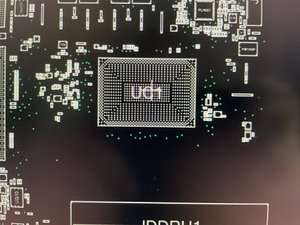
Whilst replacing my thermal paste, I accidentally knocked over (and lost) 3 bypass capacitors, the pads are still in place (thankfully) how difficult are they to replace and what is the name of the component?
I’m debating whether or not to replace them myself or let a technician do it if it’s not prohibitively expensive and how safe it is to temporarily use the laptop without replacing them
You won't find these capacitors in the schematic for the laptop / its motherboard because they are part of the CPU package. These capacitors are there to provide filtering for the power going into the CPU die, and generally that power needs to be very "clean". However, I'm not fully convinced you knocked them off unless you were really rough cleaning the old paste. Like Bill mentioned, they could be unpopulated from the factory.
There's relatively low risk to testing out the laptop in its current state, it may not want to boot up, but you won't do any long term damage to the machine / its CPU if those capacitors are actually necessary.
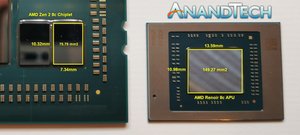
Also, this may not be the same exact CPU, but note that some capacitors are missing in this similar AMD SoC:
Manufacturers usually don't tend to put in components unnecessarily. They are there for a reason. Even more so when located near a CPU. Personally, I wouldn't risk turning it on until it was fixed, but it is your laptop so your decision.
To find the value and type of components you would need to have the schematics.
You would also need to have a boardview file of the motherboard, which shows the component layout of the motherboard and more importantly the component's board designation which is needed to find the component in the schematic to get the information you need.
Once you know the value, search on places such as mouser.com, digikey.com, element14.com etc to find the part
The best that I can find out is that the motherboard is an LCFC NM-D562.
I couldn't find a free download for the boardview, so you will have to purchase it. (This is the cheapest that I could find) You will also need to find the appropriate software to open the boardview file to view it as well
I won't argue with a tech but you might want to check out the capacitors shown on p.18 (on the left side) as some are hooked up to a "CPU" voltage supply.
Did the tech mention how they knew what the value/type is, of the missing components?
Many times, the mfg will not place all the components that the PCB provides for. The picture does not appear to have solder on those pads, so I doubt that there was any component there. It is not unsafe to operate without them if they were there. However, the computer might be unstable.


 1
1 


 91
91  65
65