3
3 Additional Detail on Connector Handling?


First, thanks for the website. Without this i would not have considered cracking open the old Studio. I've replaced both of the SSDs, and will also replace the fans, one of which was locking up, even after blowing 8 years of dust out of it.
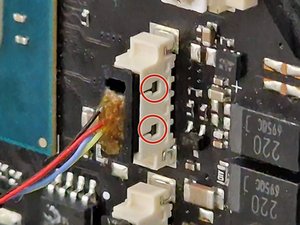
I'm having a very hard time with the tiny little fan connectors. Don't want to rip the cables, even though I have new fans to put in.
How exactly does one release the connector? What does one press on, or push, or prod? I've got my trusty spludger here, but have tried pushing on the ends, the sides, and tried jiggling the connectors, but nothing seems to come out. I half-expected to press the "right thing", and hear a satisfying click -- nothing.
Also, the audio connector came out from the board instead of the inline connector, which I also couldn't figure out how to release.
Anyway, enough whining... I hope someone sees this and takes pity. Also, though I don't wish any ill will, I hope the answer helps someone else out.
좋은 질문입니까?

 7
7  2
2