주요 콘텐츠로 건너뛰기
수리 커뮤니티 가입 - 계정 만들기

2019년 4월 출시. 모델 번호: A705FN/DS

Why my phone couldnt charge?

Hi.

I couldnt charge my phone. At first, the screen only display the symbol of current (without any percentage numbers as per normal charging). And now, when i connected my phone with the power cable, the screen is just blank. In both situations, the phone couldnt be charged at all.

Ive used different chargers, but the problem remains.

My main worries are the data in the internal storage.

How can i recover all data, including the whatsapp chats, sms, photos, documents, etc, when the phone has no power and couldnt be charged?

If the problem is with the charging ic, what can i do to get all my data in the phone back?

TYIA

이 질문에 답하기 저도 같은 문제가 있습니다

좋은 질문입니까?

점수 0
댓글 달기

답변 2개

가장 유용한 답변

Without further information, I cannot give you a definitive answer as to why it is doing that, but it seems from what you say that it's a charging issue.

On the A70 most common issues are either the FPC connector on the main board is failing or possibly the battery has gotten too low for the phone to accept a charge.

Try this first:

Start by pressing with quite some force on the back of the phone around 1-2cm above the Samsung logo, then plug the phone back in to see if it charges. this might reseat the FPC connector inside the phone and get it charging again enough to recover your data, keep in mind these are not proper fixes and the phone is prone to have the same issue. So you should not continue using it after data recovery.

If that does not work, next step would be to open the phone and start by check the battery voltage to see if it is too low.

Good luck!

이 답변이 도움이 되었나요?

점수 3

댓글 1개:

This worked for me, unfortunately I dropped it a couple of times and didn't have a cover on it. Thank you soooo much!

댓글 달기

@bellaonez first follow the steps outlined by @stuig Quite right about the flex cable from the Sub board (charging board) to the Main board. Those do come off quite often.

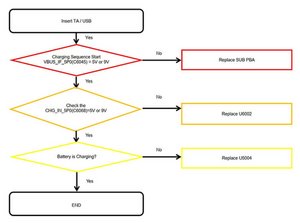
Now, if that should not resolve anything, you will have to disassemble your phone. Use these guides Samsung Galaxy A70 as well as videos like this. Next follow the flowchart for the no charging issue

이미지

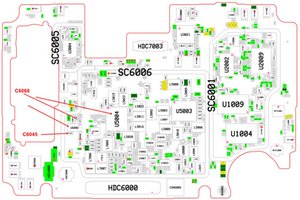
and here are the components to test

이미지

Bottom line: flex cable, battery, Sub_PBA (charging board), Charging IC. The charging IC will always be last. You do have to check it according to the values listed in the flowchart.

Do not start with the most complex part!

이 답변이 도움이 되었나요?

점수 2

댓글 5개:

I have this particular problem too, and cannot seem to figure out what the problem is. I have already opened up the phone, I have taken off the flex cable, and I want to know, how do I check if my VBUS-IF-SP0 connector is okay with a voltmeter. I Have tried a hard reset, it did not work.

@elijusskersys you check the voltage on C6045 and see if you get the 5V or 9V

@oldturkey03 How should I take off the protecting metal?

I have a question, what is the SUB PBA?

@elijusskersys that is your Sub board or the daughter board (charging board) By protecting metal I assume you are referring to the EMI shield. Some are soldered on and some are just clipped in. If it is soldered you can desolder it or you can use some small shears to cut those (careful so you do not ruin any component)

댓글 달기

답변을 추가하세요

Bella Onez 영원히 감사할 것입니다.
조회 통계:

지난 24시간: 7

지난 7일: 31

지난 30일: 117

전체 시간: 2,527